Showing posts with label usb. Show all posts

Monday, January 15, 2007

Tech Link (Gadget): USB Digital Thermo Clock With Air Purifier from Brando WorkShop

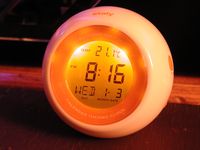
I don't know about you, but I sure love this new USB gadget reviewed by DragonSteelMods. The gadget works as a digital clock, a digital thermometer, and take this, air purifier! Check it out...


Depending on your work environment, the air might not be as clean as you think, you could get one of those large expensive air purifiers, but they take up lots of space, or you could get a USB powered one from Brando WorkShop that is also a clock and thermometer as well. So today for review I have the USB powered Digital Thermometer Clock with built in Air Purifier from our friends at Brando WorkShop. This thing is tiny, and can purify the air in up to a 100 square foot room or office so you can breathe easier with some nice clean fresh air. So let's jump right on into this review to look at this nifty little device a bit further...


Source:USB Digital Thermo Clock With Air Purifier from Brando WorkShop

Saturday, December 16, 2006

Misc: Omigosh, USB Humping Dog!

Anyone who may know how to get one, do let me know please. I want one (or two) for Christmas! I am drooling for this cool USB device! It could be from Japan or Taiwan, I can't be sure, but I am 100% sure I want it this Christmas.

Thursday, November 23, 2006

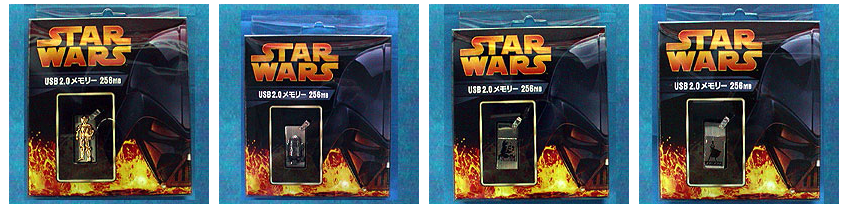
Tech Link (Gadget): Star Wars character USB flash drive.

Yay, another gadget :). I wanted to have this, if only to brag it to fellow StarWars fans like me. However, the author of this article seems to be at a lost as to what Star Wars is. I guess to each his own :).


I don't watch movies that have Star or Space in the title (Star Trek, Battlestar Galactica, Lost in Space, Space Odyssey), but I do know some people who would ditch their 6-gig Megadrive for this 256MB designer Star Wars flash memory stick in a heartbeat.

These stylish, metallic quarter-sized drives come with a full-body image of a Jedi, Darth Vader, Boba Fett, or Clone Trooper. Whoever the fuck those people are, I don't know, because I slept through Star Wars: Episode 1 and will never again waste $10 on that silly movie series again.


Source:Star Wars character USB flash drive.

Saturday, October 14, 2006

Tech Link (Gadget): USB Cannon

You have seen the USB Missile Launcher, now how about a little going back in time and instead of Missile, a Canon is used instead! Wow, this is one hot stuff, it's out of stock last time I check. You gotta have this one, if only to annoy anyone you found poking behind your back looking at what you are browsing when you're not busy at work. Woot!


Why boing rubber bands around the office when you can aim and fire foam darts with a flick of your space bar? Powered and controlled by your PC, this comedy cannon will blast its squishy ammo up to 20ft amidst a cacophony of circus music. Includes net for target practice.


Source:USB Cannon

Friday, October 13, 2006

Tech Link (Gadget): Optimus Mini Three Keyboard Review

Looks like XBitLabs had some issues with the gadget, but if you're a gadget freak or worst (or better, depending on your belief, yayayay) a fanboy, then you'll be drooling (if not getting) over the really cool looking piece of device. Expand to check what is XBitLabs' thoughts...


Conclusion
Today we did our best to share with you our impressions and experiences from working with Optimus mini three keyboard from Artemiy Lebedev’s Studio. Summing up I have to say that our impressions turned out pretty ambiguous. On the one hand, Optimus mini three is a very interesting, beautiful and useful USB gadget. It can be used for a lot of different tasks and theoretically features unlimited functionality thanks to flexible software. Besides, this keyboard is designed greatly and looks good. I believe the use of OLED displays inside the keys is a nice solution.

Unfortunately, despite all the positive emotions we had from this product and the pride we feel for our fellow Russians, we cannot forget about the drawbacks and bugs that we discovered during our tests. The hardware solution turned out pretty slow and it generates some strange whistling noise during work. But the biggest problem with Optimus mini three is the software. The current version of Optimus mini Configurator boasts very scarce features that are much less impressive than what they promised us before the launch in the marketing and promo materials. Moreover, the software is not free from frustrating bugs and loads the entire system pretty heavily. Luckily, the software issues may be resolved in the upcoming Configurator versions, which we hope will happen soon. We also hope that the third-party developers will support this product as well.

In conclusion I would like to say that Optimus mini three should be regarded as the first try before they roll out a fully-functional 101-key Optimus keyboard where each key will feature a small OLED display. Of course, Artemiy Lebedev’s Studio will take note of all our comments and remarks and hopefully the review of their next offspring turns out much more positive.


Source:Optimus Mini Three Keyboard Review

Wednesday, September 20, 2006

Tech Link (Gadget): USBCell, rechargeable battery via USB

USBCell is such a very cool innovation I've seen so far. A rechargeable battery, and all you have to do is plug that same battery via your USB port. This is really neat. I still rechargeable batteries on my LED-based flashlights, as well as some gadgets and this will make charging an easy one. No need for a separate cradle for charging these batteries. Only caveat, availability is only for UK. Expand for more...


Specification

* Battery Type
* Rechargeable AA NiMH Battery 1.2v 1300mah

* Product Specifications
* Built in Intelligent Charger

* Charge by powered USB

* Also can be charged in approved NiMH Chargers

Technical

* Battery Chemistry
* NiMH - Nickel Metal Hyrdride

* Technical Specifications
* 90%+ Charged after 5 Hours by powered USB

* Also rechargeable by approved NiMH charger at 250ma for 7 Hours


Source:USBCell, rechargeable battery via USB

Saturday, July 08, 2006

Tech Link (Gadget): Yes! It's the USB missile launcher!

This is one cool gadget indeed, but a bit pricey. Price could be because of the software included or the effort to make this thing work. Hmmm, I think I can use one of those, if only to shut down a few pesky people on the distant country. Too bad, it can only reach a very short distance, just a stone's throw distance if I may give it it a guess. Click on the image for bigger pic and expand for more.

What with North Korea's recent rocketry shenanigans, Reg Hardware readers' revelation of what could be the silliest USB add-on yet couldn't have come at a less tasteful time. But what the heck, here it is, the USB-powered missile launcher.

Source:RegHardware

Monday, June 19, 2006

Tech Link (Gadget): Head(less) Teddy USB Drive

This is so neat, you have got to see this one. I love the creativity built in this one: funny, hilarious, great! I give props to the maker, I think he should be patenting it. I don't know, it's the first time I've seen one really funny. I've seen other nice twists, but this is the first one that looks gross, but not really, and turned out to be really hilarious.
Image owned by the author, whoever he is, yay

Source:Flickr

Sunday, March 12, 2006

Tech Link (Industry): Computer-On-a-Stick™

If you aren't into making your own USB stick as mentioned by THG here but needed to have one, then why not buy one?

The Computer-On-a-Stick (COS) is a USB Flash Drive featuring its own onboard Operating System, a Microsoft Office-compatible suite, PDF Creator, and tons more...

The Computer-On-a-Stick (COS) also boasts the powerful Mozilla Firefox Web Browser, Evolution email, and Yahoo & MSN compatible Instant Messenger for superior Internet connectivity

Plug the Computer-On-a-Stick (COS) into your PC or Laptop and instantly transform your old environment into a new and powerful secure workstation - without a hard disk!

The combination of low cost and a powerful Onboard Operating System provides users with all the benefits of a thin client solution without changing their existing PC hardware or software.


  • Use the Computer-On-a-Stick when your PC or Laptop’s existing OS slows to a crawl or even fails.

  • Use the Computer-On-a-Stick to continue working on Windows-compatible documents.

  • The Computer-On-a-Stick is compatible with files created in Microsoft Word, Excel, PowerPoint, Paint, and more…

  • No need to pay for expensive new software releases or upgrades $$$ !

  • View and create Adobe PDF files

  • Share a pool of office PCs or work from home without changing your own desktop each time you use the device.

  • Reduce your exposure to viruses, worms and spyware by running applications from a read-only partition on the device.

  • Connect to remote servers with secure connectivity tools, including VNC, SSH and RDP.


Source:FingerGear

Sunday, March 05, 2006

Tech Link (Industry): Kenwood*'s USB-equipped Car Stereo

Kenwood* has exciting new products, featuring USB ports to enable USB flash media as storage device for music. While it's a common thing in the PC world, I haven't seen anything like it implemented on cars!

While the webs site never really clarified the kind of music playable on the USB, I would assume that most common standards will be playable at least, such as MP3 and WMA. The car stereo is also iPod*-ready, and should be a boon for those who love iPod*, and would like pimp their car (with the new car stereo) parading with their friends and peers showing how uber the new toy is: "Hey, guys want a ride? Want to show off my cool car stereo. I can plug in my 1GB USB Flash Drive with techno music. And oh, did I mention it's Bluetooth and iPod ready? Oh, I'm so cool!".

Over at Kenwood*, I saw three(3) models, all of them are Double-DIN type car stereos, and have varying features. The models are (top, mid, mainstream): DPX701, DPX501, DPX301.

Anyway, I guess I will prefer my old Audio CD playback if ever I manage to get one, after all, I still like to hear the raw, uncompressed (relatively speaking) music on my optical media. Of course, it's great to have such options for quick, manageable, and very portable music on the road.

Check it out at the link provided below. The site is getting a massive hitting right now, so you may want to reload it from time to time if you can't get acces.

Source:Kenwood USA

Sunday, February 05, 2006

Tech Link (Gadget): Yamaha USB Mixing Table (MW10/MW12) for the Digital Audiophile

A pretty cool lookin' new mixer from Yamaha*! The new MW10*/MW12* device promises to make mixing a simple matter, and targetted for music enthusiasts who wants their home into digital music mixing studio. The best feature I find for these gadget is that it plugs directly to USB and combining this with a known software from Steinberg*, the Cubase LE*.


Aside from the simple plugging of USB, the mixer works with both Microsoft* Windows XP* platform and Apple* MacOS X*. While the web info suggests that the minimum requirements is just a thin hair above Intel Pentium III 750Mhz with 128MB of RAM, I'd suggest a newer platform if only to compensate the users' overall experience with lots of storage capacity (and may I add, in RAID 0+1 configuration). The mixer can still operate with out a PC, i.e. stand alone operation, but for the total digital audiophile, the seamless USB connectivity plus Cubase LE* will be the uber set up.

I encourage you not only to check the hardware specs, but to check all the submenus of the item page. It shows lots of information, and I particularly like the Software section page (the 2nd to the last menu from the right). There are many shots from the Cubase LE* software, and I'm sure many of you will drool on the features it offers. There's also a block circuitry diagram, which for those who love tinkering and going on the lowdowns, might find interesting.

Source:Yamaha

Thursday, January 12, 2006

Tech Link (Gadget): Optimus keyboard

I love that beautiful keyboard, aesthetics meets uber functionality and flexibility. The only thing stopping me from getting one is, well, cost *bummer*.

Release date: 14.07.2005
Cast:
art director, designer and interface developer
Artemy Lebedev
laying on of hands
Timur Burbayev
modeller
Alexey Zalata
visualizer
Nikolai Vershinin
assistant
Anna Ponomaryova


Source:Art Lebedev Studio