Showing posts with label modding. Show all posts

Monday, June 18, 2007

Tech Link (Modding): Steampunk Monitor Mod

A friend sent me a very nice modding artwork for a Dell* LCD. I know I wouldn't do anything something close to that as I am: terribly bad with art, I don't have the guts to do it, and I don't even have the money to buy myself such a nice monitor. Anyway, check out the site, as they have a very neat documentation on how they did it:

The Steampunk Keyboard looked terribly anachronistic sitting in front of my Dell 1907FP flat panel monitor and while I hesitated to tear open a $300 monitor that was still under warantee, art must be served.


Source:Steampunk Monitor Mod

Saturday, January 20, 2007

Brag: XUG 2007 @ Intel (Pooling the world's greatest enthusiasts and overclockers in one room)

If you're an unbeliever that Intel doesn't hear gamer inputs, nor do they really care about what the enthusiasts wants (and needs), better check out a thread posted over at XtremeSystems. As posted, Intel invited the top enthusiasts around the world to discuss alot of things, focusing on understanding the needs of such community.

Among the big names, they invited the uber Intel FanBoy FUGGER (XS owner), BigToe (Tony of OCZ), The Stilt (world reknown 3D, CPU and mobo bencher and modder), Chilly1 (uber cascade specialist), and FreeCableGuy (world reknown 3D, CPU and mobo bencher and modder). They did invite Hipro5 (electronics engineer genius, uber motherboard modder) but he wasn't able to attend.

The two-day meeting had a face-to-face with Intel staff and discussed so many things, from BIOS options, to motherboard design, to chipset timing and the coveted GTL reference mod, check FCG's info about this mod here. Expand to read the full scoop.


Xtreme User Group meeting 2007 was a sucess , Intel invited several of the top guys from around the world, They were flown in and had their brain picked for two days to give Intel feedback to improve the desktop platform and give the enthusiasts the features we love.

First up and most exciting is the GTL reference mod, it will allow the needed adjustments to Intel 975x chipsets to run the Kentsfield to much high FSB speeds, this is fairly simple and gives more control of each cores FSB ability. To best describe the mods; when you clock up the Kentsfield FSB, the window of operation climbs out of reach, with the mod in place it will allow us to adjust that window. One could locate the correct pins on the CPU to locate the mod point on the motherboard.

Much of day one covered chipset and bios, we went over what features we would like to see and why. Everything from reporting MCH timing in bios to addition of an application like memtest to be enabled from bios.

One of the biggest problem is bios reset and we played with the watchdog timer to see it fails to meet the demands of its use. The board will re-post given the bios functions corectly. There was a new XBX2 bios posted two days ago on Intel. We wanted an option to hold the insert, home or end key on the keyboard to boot at default settings to recover a failed OC much quicker, we also request the BIOS config jumper to be moved to the PS2 stack at the back of the board.

We covered voltages, timing and latencies in what we would like to see. We suggested an option for xtreme overclockers to access even higher votlages and advanced settings, no soldering would be needed and it would require you to void your warranty to access these potentially dangerous settings. We went over FSB strap selection for both 975x and 965x chipsets, we went over the differences of both chipsets and undocumented features we would like access to. Such as 1T selecton that is present on 965x and left unused.

We were given a window tour of fab 20 were the chipsets are made, it was very cool to see the massive hardware needed to manufacture the silicon wafers and each step explained in detail from the engineers who manage that fab.

Day 2 started with chip lapping with the thermals engineer as well as IHS removal, we went into detail the poor surface level of the Intel IHS and the variation in core temps if left un-lapped.

I sent one of my cascade to Intel but it did not arrive intact, it was very low on gas and we elected to skip that portion with just a brief fire up of the units, it did reach -80c but it had no capacity.

We had a tour of the validation labs and met with many of the engineers in Hawthorne Farms Campus.

XS was allowed to invite six people to attend but Hipro5 was not able to make the meeting. Tony, The Stilt, Chilly1 Freecableguy, and myself were in attendance. It was good to meet Roger, a quiet guy and I am sure he had a blast.

I wish I had pictures but we were not allowed cameras in the buildings. We did take a group photo with the engineers that may be forwarded to us at a future date,

Many thanks to Intel for inviting us to your facilities for VIP treatment.


Source:XUG 2007 @ Intel

Monday, October 09, 2006

Tech Link (Casing): Project War Machine

KikBoxes has new case mod ready for you! I mean, a tank and a computer chassis, what more can you ask for? Go ahead, gear up and stuff up and check out the new bad boy.


Project War Machine (available at www.XOXIDE.com)

What is War Machine?
Sometimes the best way to explain the mood of a piece is to create a back story. Imagine the Nazis found a mystical piece of ancient Roman war machinery. Imagine they cleaned and repaired it by adding panels of sleek shiny black to those areas that had been ravaged by time. Maybe they hoped it would help them win the war. Whatever, you get the idea...

The design
War Machine will be an amalgamation of styles from a few sources. The idea is to create a case that appears menacing and yet stylish. Light in weight but very heavy in mood and appearance. A case that mixes elements of organic looking cast iron power with sleek polished features.

I am focusing on what I hope will be a nice balance of mods and finishing. I imagine this case being what you might get if you mixed the Roman Empire at its peak with that of Nazi Germany 1942. Hard to imagine? Well, maybe it will begin to make more sense as you read the work logs or buy the case today!

For a long time I have been fascinated with the Roman Empire. As a kid I read a great book about the ancient general Hannibal who led an army made up of many nations over the Alps to take on the Romans on their own turf. At the end he faced the same bitter defeat that so many who opposed the Romans shared but he had some stunning victories along the way. That book started my interest in all things Roman. The fighting style, the culture, their society and technology.

Another thing that I found interesting was how the Nazi party of WWII modeled much of their imagery after that of the Roman Empire. Bold colors in black and red, vertical banners, use of the eagle in their emblems...I could go on and on. This project is, in part, about that contrast. So let’s get down to it.


Source:Project War Machine

Sunday, April 09, 2006

Tech Link (Modding): Making acrylic fan grills

GideonTech has a nice article about making your own customized acrylic fan grills. I always fancy making one, and every time, I ended up messing the whole acrylic sheet and cursing myself along the way. I would totally waste a whole sheet to just come up with a simple modding project, I guess the art is just lost in me and patience is definitely not part of my virture.
Images owned by respective site/owner

Anyway, if you have the knack for modding or just want to learn more about this "hobby" or skill, then hea>d on over at GideonTech. I read thru all the processor and browsed thru all the pictures. What I can probably say that you shouldn't "copy" from the article is the lack of protective gear for the hand. It just doesn't look right, and I find it really scary that the modder was actually operating it with his bare hands. Eeeew, I quiver with the thought. Call me chicken, but for me, safety comes first and I'd definitely love to have my fingers complete.

Source:GideonTech

Tuesday, February 14, 2006

Tech Link (Modding): "TransTFT", a stunning LCD Mod!

Another great modding idea, and masterpiece done over at MetkuMods. This is really awesome, looking at it makes me drool so much. The effort, creativity, and execution is just so professional, I'd wish I have the skills, money, and of course, guts to do something like that. Turning an old LCD into a work of art, truly a masterpiece.
Image owned by MetkuMods

I bought an old 15" tft display from my friend because the display of my laptop didn't offer enough workspace. This monitor just happened to be too ugly to be tolerated for long. I never had the guts to modify my laptop, so this new screen of mine offered a great opportunity to refresh my building skills. I turned some of my ideas into a 3d model to see how they look. The leading idea was to show the parts of the tft and of course: it shouldn't be too hard to build.


Source:MetkuMods

Monday, February 06, 2006

Tech Link (Modding): Whisky PC, PC In A Bottle

MetkuMods has one little powerful mod article. This is one booze you'll all want to have sitting right next to your mini bar or maybe, at your living room, posing as a readily available booze for your visitors. The mod is so small that it requires a mini ITX PSU similar to what I posted before here.

The system is no slouch, equipped with a decent Intel® Pentium® !!! 733EB, a sleek 256MB laptop RAM, with 40GB of storage and with a 60W mini-ITX PSU (for more info on this PSU, check my previous Blog entry here). This is one mod only fitting an expert tweaker, from the hardware electrical parts, to the actual materials used on the mod.
I already had a powerful computer setup so I wanted something more quiet, small and low power consumptioning to function as a basic home server. I love to tinker with hardware etc. so I wanted to make something quite unique for a case. I have seen many nice and creative cases before but none of them were made out of a bottle. In November I bought an industrial 3.5" SBC board (with Socket370). For the project I selected a 1.5 litre Ballantine's bottle for case. That was the proper size and shape for the task at hand.

Source:MetkuMods

Thursday, January 19, 2006

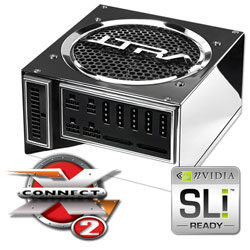
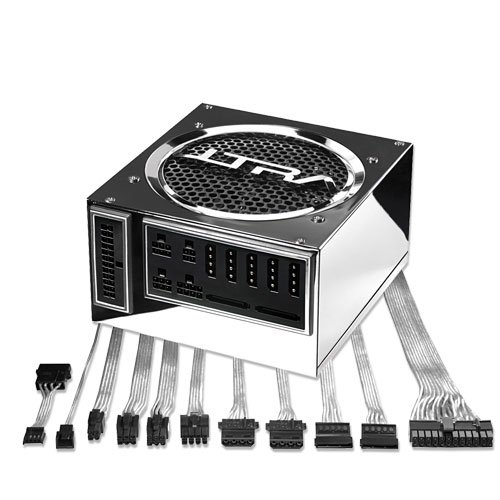
Tech Link (Power Supply): Ultra X-Connect 2nd Generation (X2)

This new PSU just makes me drool so much. I currently own a first generation Ultra* X-Connect*, and while they really do look good, I find using them on mid-atx chassis is a bit tricky. The full-atx chassis is best suited for the first-gen Ultra* X-Connect*, but even so, those huge round silver-braided-plastic-coated cables are just too huge. The benefit of making them modular just ensures you really don't have to fight for bending and forcing the stiff cables around your chassis, if they aren't modular in the first place, they'd be counter-productive.

Aside from the new looks and new electrical features, one design aspect I really like about this PSU is their Flex-Force Technology. It makes managing, sneaking your cable connectors inside the chassis much more easier. The feature also improves airflow, and making your chassis looking neat and clean, and for modders, neatness is king.

Then they have usual feature they had with the first version, like the High-Gloss Mirror Finish, Modular Design, and Power Protection (Short Circuit, In-Rush Current, Thermal Overload Cutoff). Other new features is the Titanium Finish, Dual-Rail, and 120mm Cooling Fan.

However, even with all those features, I think they missed Active PFC. I really don't know why they keep missing that feature. Anyway, I guess they're leaving it for the next revision.

And oh, 3DGameMan already has a review up on their web. Go get a look see here.
Source:Ultra

Saturday, January 14, 2006

Tech Link (Power Supply): picoPSU-120 12V DC-DC ATX

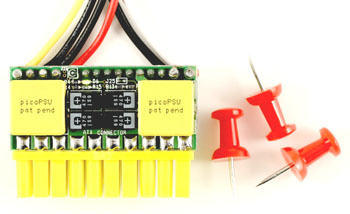
Wow, a really small but powerful power supply. This has got to be the smallest power supply I have ever laid my eyes on, at least, one that's used on a modern PC. This PSU, no bigger than the ATX connector itself, packs a whooping 120w of power, slids nicely on a standard ATX motherboard connector, and due to lack of fans, uber silent.

This is definitely not your normal PSU, this is a DC-DC PSU, needing an external power source to feed it. The PSU is no bigger than the ATX connector itself, with connectors just enough to power a small ITX-based system. it has five(5) connectors: four(4) cables for +12v, +5v and GND wires for two(2) four-pin Molex plugs and a single floppy drive connector. This kind of PSU will be great for people who likes small and silent systems, and also for modders who has a nick for making really small creations. Oh btw, once you check the link below, stroll around the site as well and see lots of amazing products there.

Introducing picoPSU-120, world's tiniest 12V DC-DC ATX power supply unit (PSU)

Compact design, less cables. The picoPSU-120 is the smallest snap-in ATX dc to dc power supply. The picoPSU is compatible with an entire range of mini-itx motherboards as well as regular boards. The picoPSU-120 provides a cool, silent 120 Watts of power for small PC designs using a single 12V power source.

By using Patent Pending HyperWatt[TM] technologies , picoPSU-120 packs an impressive amount of power relative with its very small footprint.

Small computer projects start with small power supplies. PicoPSU-120 is a crucial key component that unleashes the ultimate power solution for general purpose computing platforms. PicoPSU-120 is fully ATX compliant, making it an excellent candidate for any silent, 12V DC-DC computer project.

Reduce space. Eliminate 20 unnecessary wires by plugging in directly into the motherboard ATX connector. The picoPSU-120 12V dc-dc ATX converter was designed from ground up to fit small form factor ATX boards, allowing enclosure designers to save space while not compromising power requirements.

Cool power. Operating at only 12V, the picoPSU-120 dc-dc ATX power supply delivers 120 Watts of power. picoPSU provides plenty of power (via ATX connector and HDD cable harness) for CPU and an entire range of peripherals.

100% Silent The picoPSU-120 mini PSU is a 100% silent dc to dc solution. No fans, no noise, just power for small and silent PCs.

picoPSU-120 is a fully compliant DC-DC ATX PSU. It can power VIA mini-ITX boards with C3 or C7 processors, P3, P4, Pentium-M, and AMD processors.

picoPSU-120 ATX DC-DC converter is very small, measuring just 31x45x20mm, about the size of two AA batteries, picoPSU-120 is also 1U ServerRack compliant. It's pico, indeed.

CE / FCC / VCCI Certifications: EN55024, EN55022 Class B (CE certification), Australia/New Zealand (using CISPR 22, EN55022), Japan (VCCI: using CISPR 22, ANSI C63.4), United States (FCC Part 15, Subpart B, Class B), Canada (ICES-003 using CISPR 22, ANSI C63.4).

Source:mini-box

Saturday, December 31, 2005

DIY: OC* Front Panel Connectors

I decided to make a short DIY about making a quick and dirty "front panel" connector buttons and LEDs. If you are clueless about what it is, or just have the time to read thru the fanboyism, then click away to read it...

All materials ©2005 by DM, reproduction by permission only
Target Audience: N/E/O/B (N=Newbie, E=Hardware Enthusiast, O=Overclocker, B=Budget)

A tweaker in the hay...


If you are an uber fan boy tweaker, chances are, you don't have your motherboard, cpu, ram, power supply, hard disk, optical drive, and whatnots inside a chassis. Yeah, that's right, you'll be oftentimes needing to tweak your hardware and removing and installing your components inside the chassis will become troublesome for you to do in a seemingly endless manner.

Or maybe, you're just like me, a laptop user, who have my desktop parts like processor, motherboard, and memory always stashed inside the box and never used them, only until a customer would like to see a demo, or I feel like tweaking, or I just get bored and decided to play a bit.

Or maybe you're just very patient to install/remove your motherboard, and you oftentimes ended up having your system out of the chassis for some tweak loving spree.

Screw the driver...errr


In any case, chances are, you're using a screw driver or a similar tool, to jumper the "switch" to power on the system. But doing this becomes troublesome when you are tweaking for hours and hours on end. It can be a pain, or just plain hindrance or just slows you down. So instead of using a screw driver, (or similar tool) why not just make quick switches to ease up and simplify the process.

The secret ingredients!


The materials are very easy to find, you can see and buy most of them at your nearest electrical parts supplier. You'll need some cables with jumper headers, and a button-type switch. Now, I don't really exactly know what these switches are, but just your normal push-button switches.

::Switches and Push Buttons and LEDs::


As you can see from the above image, I have tons of cables ready for my modding loving spree. Btw, you will need a soldering gun and lead as well, if that's not yet obvious to you.

The steps to enligthenment...


This is elementary already, but for those who are actually still clueless, this will be a very short guide to how you actually make a button.

  1. First, you cut the cable with header like so...

  2. Then you solder the cable to the push button. If you would like, you can use heatshrink tubes, so be sure to put it these tubes before you actually solder the connectors. In my case, I never used one.

  3. And you're done. The only step needed to do is to install it on your motherboard front panel header.


How about the LEDs...


But of course, this is easily accomplished by doing the same step. Only that, you use LED instead of push button jumpers. I will not repeat the steps since it's the same old banana. I'll just post up some pics to give you a clue if you're still that clueless.

::Image Gallery::


Some more twists...


I can't stress it enough, how important and at the same time, easy it is to make this simple buttons and switch. This is a very simple mod to do, and can lasts you a long time instead of looking for your tool to jump-start the PC. You can use the LEDs to quickly give you clues as to where the motherboard is at now, specially the HDD activity LED and Power ON LED.

I made several twists for this as well, which I actually sold to my bratty clients. It's a simple one as well: just make a break out box: a simple PCB to mount the buttons and LEDs, and solder them, then set it up inside a box. Then ensure your motherboard headers are long enough, and make a provision at your box where your cabels are going out. Instead of loose parts of LEDs and buttons, you now have a single box with motherboard header protruding out of it. I even made a custom made sticker so my bratty clients will not try to open it =)...not that it contains any special chip or programmable device, but hey, if you're a clueless noobie, you will never know what's inside the box and I can sell it for a good cash too! Another one is mounted on a PCI bracket, but it actually only has the CMOS reset jumper, so I don't have to open up the chassis everytime I messed up the CMOS.

Till then, have fun doing the simple mod and happy new year!!!
All materials ©2005 by DM, reproduction by permission only

OC* = "Outside Chassis"