Showing posts with label conroe. Show all posts

Thursday, April 12, 2007

Brag: Intel® Core™ 2 Duo E6320@500MHz FSB

For those who sent me email asking what's the max FSB for this Intel® Core™ 2 Duo E6320 processor, well, sad to say that I can't tell. Seems like my skill (or lack thereof) has prevented me from going beyond 500MHz FSB. As much as I'd like to push it further, it would seem that I need to mod the motherboard just to find the highest FSB for the processor. If you would like to check out the four (4), yes only four (4), benchmarks I have prepared, then expand to read more. Or you can just click on the image for the CPU-Z validation link.

After opening the RAM I won from the XS contest (thanks FUGGER), I quickly put it to the test and found that it can do 1066MHz@2.4v@CL5 so it should be good 500MHz easy. So after installing the RAM, here's my setup

My test set up is as follows:
Intel® Core™ 2 Duo E6320 (ES)
OCZ Platinum PC2-6400 CL5 2x1024MB Rev2
Asus® P5B Deluxe, unmodded BIOS 1011
Asus® 7900GTX 512MB v93.71 driver
Thermalright® XP90 with Delta 92mm fan
Delta® 670w PSU
No chassis

CPU vCore is at 1.415v, vFSB is at 1.45, vNorthBride is 1.65v, vSouthBridge is 1.8v, and ICH is at Auto. As much as I'd like to see the raw MHz for FSB, the mobo is not cooperating. After several tries today, I gave up and settled with 500MHz FSB. However, this is unstable. I can only do SuperPi 1M for benchmark and it's a hit or miss. I decided to backdown a hefty FSB frequency, and at 485MHz FSB, the system is bench stable. I can't say if it's rock stable coz I was only able to do several short stess test. If you are interesred, you can chek out the ORB link for the following:

3Mark01SE - 51,561
3DMark03 - 26, 674
3DMark05 - 11,565
3DMark06 - 6,501

FanBoy out!

Sunday, March 25, 2007

Tech Link (Overclock): Intel Core 2 Extreme Edition 2.93GHz@5.1GHz

Thanks for visitors and friends who frequents my Blog site and contributing. I got an email about my Blog post about Abit@CeBit, apparently, not being able to use the phase change cooler for some OC loving due to CeBit not being able to provide enough current (talk about the source of that news, FUDZILLA, that taught me it's another INQ garbage site). Well, according to the interview with hipro5, an uber Intel FanBoy like FUGGER, the problem was the 110v vs 220v. Well, that's just too bad. Anyway, watch the video at Hexus.TV and watch fellow Intel FanBoy show off an awesome 5.1GHz overclock (Hexus titled it 5.4GHz though, ugh).

Source:Tech Link (Overclock): Intel Core 2 Extreme Edition 2.93GHz@5.1GHz

Saturday, March 24, 2007

Tech Link (Industry): Intel vs. AMD: Today's generation compared

Want to feed your FanBoyism even more? Then check out the latest article from TheTechReport. I enjoyed reading the Conclusion part, so I never bothered reading the rest of the article. Well, they are a pretty good site, more trustworthy than AMDTech, so check out their great article and indulge yourselves.


Conclusions
The fact that Intel retains the overall performance crown comes as no surprise. As we said at the outset, AMD has no real answer to the Core 2 Extreme X6800 among its dual-core processors. Also, Intel's quad-core CPUs tend to scale better than AMD's Quad FX platform, especially for typical desktop-class applications. Our move to Windows Vista x64 has done little to alter this dynamic. At the same time, Core 2 processors tend to draw less power and to be more energy efficient—sometimes markedly so—than Athlon 64s. Right now, Intel has the magic combination of a superior processor microarchitecture and a more mature, fully realized 65nm manufacturing capability working together on its side.
This one-two punch has allowed Intel to maintain a performance edge at most price points, despite standing pat through AMD's aggressive pricing moves and new model introductions. AMD's current weaknesses manifest themselves most fully in its high-end models, like the Athlon 64 X2 6000+, which draws more power at peak than the Core 2 Extreme QX6700 yet is often outperformed by the less expensive Core 2 Duo E6600. The Athlon 64 looks more competitive in its lower-end incarnations like the X2 5000+ and 4400+, which match up better on both performance and power characteristics against the Core 2 Duo E6300 and E6400. These processors have the benefit of being available in 65nm form, and I'd say the minor performance penalty one pays in performance at 65nm (due to the slower L2 cache) is worth it for the reduced power draw.

This low-to-mid-range territory, incidentally, is where I'd be looking to buy. Many of our tests have shown the benefits of quad-core processors, but honestly, finding applications that will make good use of four cores is not easy—and the list of games that really use four cores is approximately zero. I'd probably grab a Core 2 Duo E6400 and overclock it until it started to glow, if I were putting together a system right now. I must admit, though, that I have an almost irrational fondness for the Core 2 Quad Q6600, probably because it's the most energy efficient processor in our Cinebench power test. The thing is by no means a great deal—two E6600s will set you back over $200 less than a single Q6600—but it's easy to imagine a near-silent multitasking monster built around one.

AMD would do well to expand its 65nm offerings into higher clock frequencies as soon as it can reasonably do so. That may take a while yet, given the limited overclocking headroom we've seen from early 65nm Athlon 64 X2s. Meanwhile, Intel isn't likely to sit still for much longer. Rumors of an April price cut abound, and in light of the Core 2's ample frequency headroom, higher speed grades are a definite possibility, as well. For AMD, its next-generation microarchitecture can't come a moment too soon.


Source:Intel vs. AMD: Today's generation compared
Questions asked, questions answered


Sunday, March 18, 2007

Brag: Intel® Core™ 2 Duo E6420 Initial Benchmarks (and 50% Overclock)

Well, I finally got the time to plug in the 3rd CPU I got from the old box of goodies I got some time ago. It isn't based on Penryn, as seen on the CPU-Z screenshot and validation link. It's a good overclocking CPU, and performs really well. The 4MB L2 cache has done wonders with the CPU, and performance has really improved. If you would like to see the initial benchmarks and the 50% OC, then expand for more...

Disclaimer: This is an ES CPU, retail may or may not have changes from this sample.

Quick Overclock:
This is just a quick and dirty FSB overclocking and nothing fancy. This overclock can be done even by those noob overclockers, the processor is just so OC friendly. I reached 1600MHz FSB (400MHz QPB) in just under 10mins, and it's rock stable. I can run multi-threaded prime for more than 2hours, complete all kinds of FutureMark* benchmarks, and it'll run happy with Aquamark03, and even Doom3 time demo. And yes, it's on stock cooler and all stock voltage too.

Stock Benchmarks:
For the curious, test set up can be seen on the CPU-Z validation, and aside from that, I am using a typical WinHEC 550 Power Supply, and stock cooler. Here are some early stock benchies for you to feast on going head on against Intel® Pentium® D 940.

Cinebench 9.5


wPrime 32M


SuperPi 1M


That is all for now, FanBoy out...

Wednesday, February 14, 2007

Brag: Intel® Core™ 2 Duo E6320 says "aye"

After the failed attempt to determine if my new CPU is already Penryn one, I decided to try the next CPU in the queue. You can click on the image to zoom up on the CPU-Z image.

Well, this one is still not my highly anticipated new CPU based on the new core. Oh well, I guess I still have the other CPU to try out. For now, I am removing the details of the CPU and just posting very limited information since I don't know how much info is being posted already on the next.

In any case, I plan to test the third, and last flavor of CPU I got next week. So you may want to check back again to see if I do end up with a Penryn core next time. For now, I will leave you all with the guessing. First, you've seen the overclocked Conroe-L, now, this E6320. Time to hunt for the details using your trusty Google.

Have a good Valentines Day

Monday, February 12, 2007

Brag: Conroe-L has arrived...

I received a new box of goodies, and it came with sweet surprises inside. The box came with three (3) flavors of new processors, and I was like a kid excited with a new toy.

I don't know which one to pick, but I decided I'd like to test in random. So I jumbled the three(3) CPUs together, closed my eyes, and picked one. And this is the one you are seeing now, Conroe-L, as CPU-Z puts it. I don't really know how much info has been posted already on the net, so I'll just share the CPU-Z but edited the image to hide some of the details. Oh, this processor is overclocked already, just in case you're wondering :) and you can click on the image to see the full size.

I'll post the other CPU-Z screenies of the remaining two CPUs so stay tuned. Will Penryn be one of the CPUs in here already? Keep checking the site...

Friday, January 19, 2007

Brag: XTreview has me on the news...

Ok, not really me, rather, my overclocking spree is posted on their news. Teheee, click here.

Tuesday, January 16, 2007

Tech Link (Motherboard): Four Mainstream Core 2 Motherboards

ExtremeTech reviewed four motherboard that supports Conroe. They aren't targetted necessarily for overclockers, so if you're such type, then you'll skip this one. However, those boards are really nice and if you're not interested about overclocking, then give this one a look. They have an Abit AB9 Pro, Asus P5B-VM, Foxconn P9657AA-8KSH2, and a Gigabyte GA965P-DQ6 on the test bed.


Final Thoughts: Consider What You Need
About the only board in our roundup we'd be hard pressed to recommend is the ABIT AB9 Pro, but that's only because of its weird layout. All of these boards offer solid performance and stability at default settings. The Gigabyte GA-965-DQ6 is a dream power-user board, while the Foxconn P9657AA-8KS2H is easy on the wallet. If you're hankering for a compact but full-featured microATX board, then the ASUS P5B-VM is an excellent choice.

Motherboards have come a long way. Buying a name-brand board these days usually means you get a stable, reliable system. If you want to go beyond that, however, you'll have to pay a bit more.


Source:Four Mainstream Core 2 Motherboards

Thursday, January 11, 2007

Tech Link (Processor): Intel Core 2 Duo E4300: Affordable and Highly Overclockable

I posted yesterday that XbitLabs has reviewed this really nice processor, now AMDTech posted their own review. Both agree on one thing, it is highly overclockable as I have trumpeted earlier last year. Check out AMDTech's take on the the processor...


Final Words
Every generation a ridiculously overclockable bargain chip is born, and the Core 2 Duo E4300 is just that chip. Although it's not yet launched, Intel has a true winner on its hands with the E4300. Last year we saw overall desktop performance redefined by the Core 2 lineup, and in 2007 it looks like Intel will begin changing what we've come to expect in the sub-$200 CPU market. What's even more impressive is that in another quarter, the E4300 will drop even further to $133. At these prices you can build a second or third system with some very strong performance, at a very reasonable price tag.

The best part of it all is that the E4300 is a no-compromise core; you end up losing VT support, but all of the performance elements are there. The 800MHz FSB isn't crippling enough to really hinder performance, and the smaller cache is more than acceptable for the vast majority of applications. The Core 2 Duo E4300 is no Celeron; if anything it's a spiritual successor to a long line of attractive, highly overclockable Intel CPUs. It's everything Intel's Pentium D 820 was, but with much higher performance and a much lower power envelope.

At default speeds, the E4300 isn't all that impressive in the grand scheme of things; it's effectively a slightly cheaper, slightly slower E6300. But much like the E6300, much of the appeal of the E4300 comes from overclocking - and overclock it does. Compared to other Core 2 CPUs, the E4300 doesn't set any new overclocking records but at the price it's a true bargain.

The change in base FSB speed also has advantages in overclocking, making it possible to use a linked (1:1 ratio) memory speed and still get extremely high overclocks without resorting to anything more than DDR2-800 memory. The E6300 has a 7x multiplier and a 266 MHz base bus speed, so without dropping to a 4:5 ratio and sticking with DDR2-800, the E6300 tops out at 7x400 or 2.8 GHz. With a 9x multiplier the E4300 can potentially reach as high as 9x400 or 3.6 GHz while keeping memory at or below DDR2-800. While it is possible to get bus speeds of P965 motherboards above 500 MHz, it is far more difficult and often requires more expensive component choices, making the E4300 the new king of budget overclocking. Throw in a more powerful CPU cooling setup, and we have no doubt it will be very easy to exceed our 3.37GHz overclock by a large margin.

At stock speeds, the E4300 ends up offering similar performance to the Athlon 64 X2 4200+. In SYSMark 2004SE, DivX and some games it's faster, and in other situations it's basically the same speed. The Athlon 64 X2 3800+ ends up being slower in every benchmark, but with a lower price it's still a reasonable choice. Obviously the Core 2 upgrade path is a bit more desirable these days than AMD's Socket-AM2 platform, so the E4300 gets the nod there, but you can't really go wrong with either chip at default settings. When overclocked things get a little more complicated, but the E4300 gets the recommendation as a 2.8 - 3.0GHz Athlon 64 still ends up being slower than a 3.38GHz Core 2.

Compared to Intel's other value offerings, mainly the existing Pentium D lineup, the decision is clear. With the E4300 at $163 and moving down to $133 by Q2, cheap no longer means NetBurst. Intel is planning on significantly ramping its dual core presence this year, and with the E4300 available as a part of the lineup we can see exactly how. If you're building a Vista system early this year and want to do it efficiently, Intel is going to make it even cheaper to do.


Source:Intel Core 2 Duo E4300: Affordable and Highly Overclockable

Sunday, January 07, 2007

Article: Yesterday's Greatest versus Today's Lowest (Intel® Pentium® 4 3.4GHz Extreme Edition and Intel® Core™ 2 Duo E6300)

I almost forgot posting this article, due to the issues I've encountered with the site lately. I have completed labeling all my posts, from yesterday to the very first day. I can't believe I've gone thru all of it, but it's far from complete, I'll have to recheck the labels just to make sure it's accurate.


Anyway, during the holiday season, I manage to get spare time to play with an old and new CPU. I pit the once latest and greatest to the current entry level mainstream processor. Check it out if you're feeling nostalgic...


It is now year 2007, and we already know that Intel has been killing pretty much all benchmarks available to enthusiasts in the desk top world. Enthusiasts are now looking forward to an affordable quad core, which is currently available only to the cream of the crop users. In 2006, much has changed in the Chipzilla line of products. This year saw the launching of so many products from Intel. This year is when Chipzilla migrated from being a CPU company, into a platform company. They have launched many great products, and in this year, they have launched a new uA that shook the world, and changed the computing landscape forever. Quad Core is now the buzzword in the enthusiast segment, even before Dual Core computing became the universal mantra. Eight way computing is already a reality on the high-end server segment, and this can be achieved at an amazingly lower priced, relatively speaking, compared to a couple years back. And this octa-core computing with just two physical sockets, which is an achievement itself.


Source:Article: Yesterday's Greatest versus Today's Lowest (Intel® Pentium® 4 3.4GHz Extreme Edition and Intel® Core™ 2 Duo E6300)

Saturday, December 30, 2006

Tech Link (Motherboard): Intel P965: Foxconn P9657AA- 8KS2H

Hmm, today is value board day. AMDTech decided to get out of their uber high end motherboard review and have gone mainstream. It's nice to see websites doing such kind of review since most of the time, only mid-end and high-end motherboards are being reviewed by websites. I haven't read the full review, but I found out that it can overclock as well, though you can't expect it to compete against the big boys. Check out their review, expand this article for more.


Final Words

Once again we have a P965 based motherboard that performs equally with our other review units at stock levels. This is not necessarily a bad thing because with the base level performance basically being equal you can decide if features, price, quality, overclocking performance, or support will be the determining factor in your buying decision.

Our expectations of the Foxconn P9657AA-8KS2H varied over the course of testing as we did not anticipate much from a $100 P965 board at first. These expectations changed as we noticed the quality of the motherboard, its components, and general layout. Once we booted the board and updated to the latest BIOS our interest was piqued as maybe this motherboard would offer that perfect yet elusive price to performance ratio that we have been looking for during our P965 review process. We were at first disappointed with the overclocking capability of the board and then took a moment to recheck our original expectations of the board but more importantly ourselves.

Our original expectations of this board were centered on the stability and performance we would experience on a board that was selling for right under $100. We were also interested in the feature set and more importantly if Foxconn had designed a board that would live up to their marketing materials. Except for their recently released NVIDIA 590SLI motherboard which received a great deal of attention from NVIDIA's engineering group, their previous WinFast product lines were not the best enthusiast level boards.

This board is part of the CORE Series that promises leading technology products at affordable prices. Foxconn delivers on this point with the P9657AA-8KS2H motherboard. While not perfect, this board does exactly what it promises at a price that we find amazing for a board based on the Intel P965 chipset. The overall quality of the motherboard and its components are excellent while the feature set and layout is very good. We found the board was rock solid during several weeks of outright abuse in testing along with very good technical support from Foxconn.

We were originally disappointed with the overclocking performance and then realized we were expecting something from this board that was not promised by Foxconn in this series of product. We have grown accustomed to grading a board with the latest technology on its overclocking and pure performance aspects first and then looking at the features, stability, and other aspects of the board. We usually do this based upon how the motherboard is marketed but at times we also expect or demand premium performance at budget prices.

There have been just enough motherboards that have met these expectations to spoil us but they were usually a surprise and not an expectation. We have recently started to readjust our expectations to the point where features, quality, support, and overall platform stability are at the top of the list. Once those are addressed then we will certainly dive headfirst into the performance potential of the motherboard but with our eyes open as to what market the product is intended to reach. This board is intended for the mainstream user who needs stability, a good set of features, basic overclocking potential, and a strong technical support group behind the product. We believe this board is near perfect for that user and those buying the product looking for outrageous overclocks or class leading performance will be disappointed.

Not all is perfect with this board but a few minor issues can be overlooked considering the price/performance considerations. The location of the 8-pin ATX power connector will mean some creative cable routing will be required for the larger air coolers and even the stock unit to some degree. The overclocking capability of both the FSB and memory is limited but up to that limit the board was very stable. This board needs decent DDR2-800 to extract its performance potential but there is no need to purchase expensive kits as CAS 3 timings are not recommended. We had a few ghost issues such as our SATA drives not being recognized at various overclocks with a P4 processor or the Fox One utility occasionally not reporting the correct CPU temperature. One last minor quibble would be the addition of another fan header and Firewire support.

Overall, this is the best P965 motherboard available for under $100. It is not meant for the enthusiast group or even the hardcore gaming user. However, for the mainstream user that needs a high quality and stable Intel platform for general use then we highly recommend the Foxconn P9657AA-8KS2H.


Source:Intel P965: Foxconn P9657AA- 8KS2H

Tech Link (Motherboard): Biostar P4M890-M7 VIA P4M890 Core 2 Duo Motherboard Review

If you are looking forward to getting a new Conroe system up and running, but is hampered by the high cost of motherboards, PCStats has reviewed one ultra-value board that can really perform. They seem impressed about this board and gave it an award, and oh, it can do mild overclock as well. Expand the article to check it out check it out.


The entry level market is often neglected by the online computer community but it's the largest and most lucrative market for manufacturers. In general Intel rules this house, and given what we have seen from the Intel Core 2 Duo processor and the single channel memory controller equipped VIA P4M890 and VIA VT8237R+ chipsets you'll definitely want to check out what Biostar has done here.

For just $53 CDN ($46, £23 GBP), you get the tiny Biostar P4M890-M7 motherboard that's compatible with the most advanced Intel Core 2 Duo processors and it comes with an integrated VIA UniChrome Pro videocard too. The basic essentials like sound, 10/100 networking, SATA I RAID, IDE, USB and all the rest are covered too.

What's surprising is that with just a few more basic essentials you can put together a very low cost PC that's still powerful enough for most office and workstation applications.

The Biostar P4M890-M7 motherboard is fairly easy to work with even for novice users. The user's manual does a decent job at describing the headers and basic rundown on how to install and set up your new hardware.

Keeping in mind the intended audience, we certainly didn't expect much from the Biostar P4M890-M7 motherboard in terms of performance, but as you've seen that impression is quite wrong. Even with the single channel memory controller and DDR2 memory running at 533 MHz, the P4M890-M7 motherboard and an Intel Core 2 Duo E6600 processor performed quite well in the benchmark tests. It was the slowest Intel Core 2 Duo motherboard in the roundup, there's no getting around that, however it was still faster than the Intel Pentium D and AMD Athlon64 systems...

The Biostar P4M890-M7 motherboard was decent at overclocking, hitting 336 MHz FSB from a stock 266 MHz. You'll also be happy to hear that the VIA P4M890 and VT8237R+ chipsets do not generate much heat so passive cooling is all that is required.

If you're in the market for an incredibly inexpensive basic entry level computer, or the components to build one, definitely check out what the Biostar P4M890-M7 has to offer. It's not super fast, but with PCI Express expansion possibilities it has a lot of value to offer those looking for only the most essential features in a computer. Plus, as the benchmarks indicate it handles most workstation style applications satisfactorially


Source:Biostar P4M890-M7 VIA P4M890 Core 2 Duo Motherboard Review

Thursday, December 28, 2006

Press Release: ASUS Commando Gaming Motherboard Enables System Bus Overclock up to 2,280MHz for Smooth Graphics Performance

Woah, this is going to be my next board from Asus. I have posted some early reviews and benchmarks of this board, and if you haven't seen it yet, better check it out and start saving up. Aside from the all-solid capacitor and on-board switches, the CPU socket area is free of capacitors! Way to go Asus!


Taipei, Taiwan, December 18, 2006 – ASUSTeK Computer Inc. (ASUS), the worldwide leader of motherboards, today introduced the Commando, a new addition to its R.O.G (Republic of Gamers) family of gaming motherboards. The Commando provides extreme overclock ability for enhanced performance, and unique features to jazz up the gaming features and simplify the DIY process.

Overclock system bus up to 2,280MHz
Supporting the Intel® P965 Express Chipset, maximum 8GB dual-channel DDR2 architecture, PCI Express x16 graphics and multi-core CPU, the Commando is ready for the latest computing hardware and software specifications. With superior engineering, the Commando provides unmatched overclockability, taking FSB and memory up to 2,280MHz and 1,300MHz, respectively.

Extreme Tweaker – One stop performance tune-up
Extreme Tweaker is a one stop solution for fine-tuning system performance. Frequency adjustment, over-voltage options, memory settings etc. can all be tweaked with this feature, which is found exclusively in ASUS motherboards.

8-phase cap-less power – Reliable power supply and longer component life
The 8-phase cap-less power design demonstrates two hardcore commitments of R.O.G.: ultimate overclocking capability, and trustworthy stability. 8-phase cap-less power yields unparalleled superiority in the overclocking arena, while the EL cap-less design removes any worries of capacitor problems once and for all.

Onboard Switch – Turn system on/off, reset and clear CMOS with one push of a button
Overclockers and power users typically build systems outside of the case, and hence they need to short the front panel pins to power up or restart the system, switch jumpers, and pop the battery to clear CMOS. With the Commando, doing all that is now just a push of a button.

LCD Poster – Easy System Tweaking with Style
Most hardcore users and engineers install a debug card, which displays a two-digit code that enables them to recognize which part of the system is responsible for hanging the system during boot-up. LCD Poster, located at the back I/O, displays the names of each boot-process instead of using codes. When system hangs due to faulty connection or configuration, the LCD Poster will freeze on the displayed process name that caused the hang up, allowing users to know exactly what needs to be fixed.

For more information on the Commando and other R.O.G motherboards, please visit the company website at www.asus.com.

Specification summary
CPU: LGA 775 Core2Duo, Quad-Core CPU
DDR2: 800/667/533
FSB: 1066/800
Chipsets: Intel P965 + ICH8R
6 SATA II 3Gb/s
Supports ATI Crossfire Graphics
SupremeFX Featuring ADI 1988b
Extreme Tweaker
LCD Poster
8 phase capless power design
Onboard switches


Source:ASUS Commando Gaming Motherboard Enables System Bus Overclock up to 2,280MHz for Smooth Graphics Performance

Tuesday, December 26, 2006

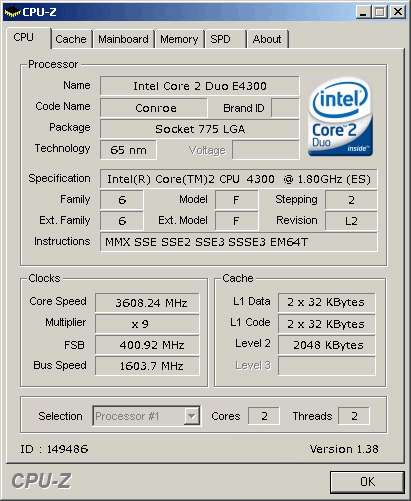
Brag: One Hundred Percent Plus Overclock (100% +++) with Intel® Core™ 2 Duo E4300 (Anniversary Special Post)

This day marks my First Year anniversary. While there's no cakes, balloons, or fireworks to celebrate it, I decided to remember this day and make it memorable by hitting a certain goal: 100% overclock of Chipzilla CPU. I have always been busy, always putting this Blog site to neglect, that I even forget posting some items. So to make up for it, I'll be spending time, and this time, I'll be spending my time playing with toyz and doing what I love most: tweaking hardware. And the victim is, the unreleased, Intel® Core™ 2 Duo E4300.


And so, I finally got some quality time for the yet-to-be-released processor(Intel® Core™ 2 Duo E4300) and got intimate with it. I have been easy-goin' with this baby till today but since this is my First Year Anniversary, I decided to put the CPU for some OCing goodness and I won't be soft this time.

After ensuring I have the latest beta BIOS (thanx NicoOCZ) on my Abit AW9D-MAX board working flawlessly (some reported a borked board after the flash), I put this board for some warm up. I put my Intel® Core™ 2 Duo E6400 and started pushing it till 400FSB and the system is very stable. I recorded all the settings, for both the RAM and motherboard, and ran stability testing software. I used the new multithreading Prime95 software (thanx eva2000) since I don't really like Orthos. So at a mere stock voltage on CPU, lowly 1.6v in vMCH, and 2.3v on RAM, it's perfectly stable and I can even complete any bencmark software I throw at it.

The result is very promising, and looking good in preparation for the Intel® Core™ 2 Duo E4300 overclocking spree. The last time I overclock it, I hit 95% overclock. But aside from lacking inspiration and the will to overclock, I gave up after not making it able to boot up past 395MHz.

But today is a different day than during the first time I overclock this bad boy. First, I have all the time in the world, without worrying if I have completed all my obligations before doing what I love most: playing with hardware. Second, I am such a fan of this kind of powerful yet low cost processor and I'd like to see how far it'll go. Third, it's Christmas season and I'd like to give myself a self-gratification of reaching 100% overclock on stock cooler, on an unmodded board! And last but not the least, it's my freakin' First Year Anniversary post. Anyway, if you clicked on the image, you'll see that I hit 100% OC on FSB already but this isn't truly 100% since I lowered the multi from the default of 9x to 8x, giving a hefty 3.2GHz clock frequency. However, the vMCH must be set to 1.7v!

So I tweaked the board, while still making sure that I am within my sanity's limit. At 1.7v on the vMCH, and 2.3v on RAM, I changed the multi to it's default of x9. Unfortunately, the system with reboot upon reaching Windows screen. It won't stabilize. This time, I am already pumping 1.5v from 1.425v that I used to ran at 3.2GHz. It will still not boot up, so I figure, either I change the cooler or pump the vCore even more. However, I am a lazy bum and I don't like to replace the stock cooler since it's much easier to pump the vCore than replace the cooler. Besides, I am not in the mood to change the cooler, and re-apply all the thermal goo and all that.

So, I just pumped 1.6v and be done with it, and woooolah, I hit the magical number. I don't know how stable it is, I could care less. I am not after stability, just clockage. If I wanted stability, I would have used a better RAM that runs at stock of DDR2-800 and aftermarket cooler. I reached 100% overclock, and I figure, why not go further? Not being satistifed with 100%, I decided just to push it a litte more, just something for Christmas and Anniversary spirit.

So mustering all my strength and the will to carry on, I brought up the FSB to 402MHz, but it's a no go. But 401MHz is just fine, so I inch a little to 403, and it's good to go. Hmmm, interesting, I went up further and shoved 404MHz and it works. At this time, I am just getting tired and lazy of all the reboots and save, so I pushed to 410MHz, and it's no go. After a few more misses, I settled for 406MHz final FSB on stock cooler, on air. Here's the final overclock of 103%! You may click on the image for the CPU-Z validation.


That is all FanBoyz, and have a Happy Holidays!

Monday, December 25, 2006

Misc: All I Want For Christmas is....

Images with a girl model owned and came from THG
So, it's Christmas time today. We just finished our tradition of sharing food come Christmas Eve on 00:00 hours. It's fun and lively, and we got to open up our gifts and I'm satisfied with I got from wifey.

However, I still have requests, not from wifey, but from my very own pocket. Somehow, I need to raise my money of my own and get myself a piece of hardware. This has been a nagging target since the product has been announced, since I've seen the very first review, and since I first lay my eyes on it on the announcement page. I just can't help but drool, I so want this hardware. What is it you ask? Well, let me list it for you.

So, I already have an Intel® Core™ 2 Extreme QX6700 and Intel® Core™ 2 Extreme X6800. These CPUs are a total kick ass and has been very good with me so far. They overclock really well, and both can do 3.73GHz even on stock cooler. And for higher than such overclock, an aftermarket cooler and a hefty bump in vCore is needed. Go check out my previews on them by clicking on the links.

And then, I have this superb motherboard from Abit. Man, I am so overwhelmed by this motherboard, except for Intel's very own Bad Axe 2, I haven't tested any other board that can handle the Intel® Core™ 2 Extreme QX6700 and Intel® Core™ 2 Extreme X6800 this good. My only gripe is that Abit is so slow to release any new BIOS to provide better-than-average overclock on the Kentsfield, but with Conroe, it's all smooth sailing.

But, and this is a big "but", I don't have my favorite RAM. I so want this RAM, I wish I have all the moolah. I just ran out of moolah and I am stucked with a 2x512MB Micron DDR2-533MHz with Fat Body D9 chips. Sure, my current RAM can overclock really well, around DDR2-800MHz for about 2.2v-2.3v, but it's not as cool looking as this OCZ PC2-7200 Spec Ops Edition Urban Elite from OCZ. That's all I want for Christmas, and I don't think I can even get one, so sorry FanBoyz, no review for this memory, not even soon.

Anyway, not to have my spirits dampen by such, I will still be happy with what I have right now, and I sure am having a Merry Christmas this year. Thanks for stopping by and reading my yet another blog posting. Till next, and may your Christmas be merry and happy too.

Sunday, December 24, 2006

Tech Link (Motherboard): Quad Core Bliss? : Nvidia’s nForce 680i SLI and Asus’s Striker

GamePC posted a comprehensive review of the new board from Asus. It does overclock really well, but they are not impressed with the pricing. I personally don't really like 3rd part chipset, but coming from Asus, I may have a change of heart on this one.


The Final Word
The Asus Striker Extreme is, and will remain for the foreseeable future, the premiere Socket-775 motherboard on the market. The nForce 680i chipset which is the core of this platform supports all of the high-end features which enthusiasts demand now, along with being the most future proof platform on the market, supporting technologies like 1333 MHz FSB and DDR2-1200 speeds. In addition, the board supports 16 x 16 SLI, a dedicated third PCI Express x8 slot, 6 x SATA-II/300 RAID ports, just about every high-end feature an enthusiast can ask for. This board would certainly be our favorite Core 2 platform to date if it wasn’t for some lingering BIOS issues which are hampering stability at this point.

As one would expect for a platform of this nature, the Striker Extreme is incredibly expensive – more so than any other Core 2 platform to date. Asus does, however, provide a slightly less exorbitant option in their P5N32-E SLI platform, which uses the same chipset and PCB design, but lacks features such as the diagnostic LCD screen, backit LED’s, dedicated power/reset/CMOS buttons and dual eSATA, in addition to having less chipset cooling and a more limiting BIOS. However, for the removal of these items, you can expect to pay anywhere from $50 to $100 less for this board compared to the Striker Extreme. While those who want absolutely everything, the Striker is there, but for those who have a bit more common sense, the P5N32-E SLI is an excellent 2nd choice.

We will say, no other Core 2 platform we’ve tested to date matches the high-end overclocking features of this board. We certainly appreciate Asus providing high-end overclockers the necessary tools to achieve the highest speeds without any arbitrary limitations thrown in for their protection. Also worth noting, Asus recently launched a board called the “Commando” with a similar concept and overclocking features like the Striker, but is based on the Intel P965 chipset. For those who don’t want SLI and want to use a little less power, while keeping tremendous overclockability, this might be a board worth considering.

Our benchmarks showed that if you’re only using a single graphics card (even a high-end model like the 8800 GTX), you will see virtually no performance difference between these high-end platforms. The only area we saw real performance differences were where applications required disk access, and in these cases, the Intel 975X chipset tended to perform a smidge better. We’re confident that Nvidia will ramp up their SATA performance in time, but for now, Intel’s got the edge here. We would still recommend an Intel based chipset if you’re looking for stability rather than performance.

The Striker Extreme is a dynamo of a motherboard, there’s no doubt about that. Personally, I feel that the feature-set doesn’t justify the cost, and if I was purchasing a high-end platform for a new quad-core system, I would likely opt for the less-expensive P5N32-E SLI. Once Asus gets their BIOS issues worked out and we see the price drop a tad, we feel that the Striker will rightfully take its place as the most lusted-after Core 2 platform on the market.


Source:Quad Core Bliss? : Nvidia’s nForce 680i SLI and Asus’s Striker

Tech Link (Motherboard): FOXCONN 975X7AB-8EKRS2H Motherboard Review

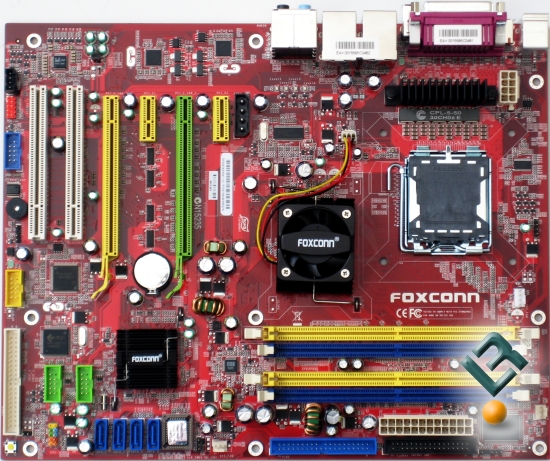
I know, I am on a posting spree, this is what's happening when you put a FanBoy on a vacation leave. It just gives me more time to brag and post and brag and post, what more can you ask from a FanBoy? Anyway, LegitReview got themselves busy with a nice motherboard from FoxConn. This motherboard is the only board that I know of that has a digital VRM to regulate power for the CPU. It looks ok, not attractive, but decent enough. The red PCB reminds me of standard board from MSI though, but anyway, check this out since LegitReviewer seems impressed.


Final Thoughts and Conclusion
So what do you say about a board that:a) Has a great layout with a great bundle; b) Performs as well as any other board out there; c) Overclocks like mad? You say that this board should be on the top of your list as you are looking at motherboards to house your brand new Core 2 Duo processor. Also, we should mention that this board comes in at a MUCH lower price than many other boards out there. Right now, you can pick this board up for a cool $159.99, which is much less than the $200+ that some of these new Core 2 Duo boards are retailing for.

One thing that should not be overlooked as we close up this review is the fact that Foxconn heard us when we let them know of a bios issue, and then within a matter of 72 hours, we had a new bios in hand, that had been tested by them over the weekend to make sure that it worked properly. This is almost unheard of anymore in the industry.

Feature-wise, this board has really everything you would want. And the bundle that comes with it is very generous considering the "low" price tag. The Foxconn 975X7AB-8EKRS2H motherboard can be found for $159.99 from online retailers, which makes it less than competing boards like the abit AW9D-MAX that we reviewed at the start of the week. The Foxconn 975X7AB-8EKRS2H represents great value from a price versus performance standpoint and an ideal motherboard for those looking to try out mild overclocking.

The ability to run a Crossfire setup also insures that you will be gaming to the best level that you can, and that you will be able to upgrade to a dual card setup if needed at a later date to extend the life of this board.

Legit Bottom Line: Foxconn really has outdone themselves with the offering of the 975X7AB. The performance and overclockability of the board are outstanding and the customer support is first class. This board certainly was not a "Dog" but a Fox to be desired. What more could you ask for in a board? With all that said, at $159.99, this board is certainly worthy of of value award for the 975X series of boards.


Source:FOXCONN 975X7AB-8EKRS2H Motherboard Review

Tech Link (Motherboard): Abit 975 board takes on two Asus contenders

If it's not for a friend and Abit, I wouldn't have posted this article. So anyway, INQ posted a "First Impression" look at Abit's greatest offering. It may not be the latest, but currently, it is the greatest. Be careful reading it though and try to develop a skill that will help you isolate the FUD from FACT when you are wading thru that freaky review. If you are ready, then take the plunge.


In Short
Abit made a great overclocker's motherboard. It has all the features that one would like and it is the 975X board that will run two ATI cards. We wonder if it will run two R600s but this will be the big question for 2007.

The board has a nice layout, illuminates the room with its LEDs, heat-piped chipsets and it make memory faster than any other 975 board we seen so far. It is great and it goes neck-to-neck with Asus' P5W DH Deluxe. It costs around €190 in Euroland depending on the country.

It is one of the best 975X boards we've come across. It is stable and worth the money but you can also consider Asus very good alternative. For dessert, we tried cableless Crossfire and have an answer to some of your questions on X1950PRO cards, we will try to tell you that story in 2007. ยต


Source:Abit 975 board takes on two Asus contenders

Tech Link (Motherboard): MSI P965 Platinum

The folks over at [H] has placed an MSI i965-based board to the test bench. While it performs well and shows no sign of nagging problems, [H] doesn't give this board a big thumbs up. Check it out...


Dan's Thoughts:
Working with the MSI P965 Platinum was a pleasant experience, but not a perfect one. For starters, the motherboard always changes the boot sequence whenever any drives are added, or if the drive configuration changes in anyway. This lead to a situation where the system wouldn’t boot, and I’d have to go back into the BIOS and change the boot sequence again. This is not an issue that is specific to MSI as many motherboards do this, but there has been a change started in the industry to correct this. Otherwise, I also had several issues with stability until I raised the ram voltage to 2.1v. The memory defaults to 1.8v, which was totally unstable. (Editor's Note: In my testing with different Corsair RAM we showed not voltage issues whatsoever.) I had another issue once the OS was loaded originally. When I went to install the .NET framework, and the Catalyst 6.9 drivers for my test X1800XT Crossfire setup, the OS blue screened, and I was forced to re-install it. This was an isolated incident, and I have no explanation why this happened.

Stability at stock speeds, while running my drive benchmarks and network tests was exemplary. For 48 hours, the system ran flawlessly, and gave me no issues. During the stress test I ran Orthos and ran SuperPi along side it just to be extra abusive. The system performed flawlessly under these conditions. Overall the MSI board was easy to work with and the problems I did encounter were easy to solve or work around entirely.

Essentially, the P965 is a great motherboard, especially at stock speeds, but unremarkable. Overclocking is mediocre, but not horrible. The layout is excellent, and the board has a solid feature set, and isn’t over burdened with an excessive amount of features that most users will likely never touch. Some issues I experienced were annoying, but should easily be fixed with BIOS and driver updates. All in all the P965 Platinum merits some consideration and I would recommend it for use in non-overclocked or mildly overclocked systems, but for the hardware enthusiast, I think there are better choices out there.

The Bottom Line
MSI has presented us with a very stable motherboard in the P965 Platinum. It ran like a champ under very heavy usage models at stock settings. When it comes to enthusiasts looking for overclocking motherboards for new Core 2 Duo processors, there are better choices available.


Source:MSI P965 Platinum

Friday, December 22, 2006

Press Release: Shuttle introduces newest lineup of gaming PCs - 1337 and 1337 SDXi system

Aside from the sucky model name of 1337, the new SFF system is very nicely done. With a custom paint job, a watercooled GPU, with an extreme Intel processor (Conroe or Kentsfield), Ati Radeon X1950 (Crossfire), 2GB of yummy Crucial DDR2-800MHz RAM, on a small form factor, this is just so freakingly awesome. This little wonder will set you $4999 at the minimum though, so it does have a hefty price tag to go with the looks and power.


Shuttle introduces newest lineup of gaming PCs - 1337 and 1337 SDXi system

Shuttle Inc, the world’s leading designer and manufacturer of small form factor computers and accessories have announced the launch of its newest lineup of gaming PCs—1337 and 1337 SDXi system. Shuttle 1337 systems bring together the best technologies the industry has to offer to make one blazing fast gaming system. 1337 systems are able to match performance of larger and louder tower systems without sacrificing the small form factor foot print.

According to Kevin Tu, Product Marketing Manager, “We made it our goal to extract the most performance from our existing XPCs without sacrificing portability for LAN parties. The Shuttle 1337 SDXi is the result, blending the best engineering we have to offer with the best technologies from Intel and ATI.”

The new Shuttle 1337 systems differ from the regular Shuttle XPC systems in form and function. Sporting a unique paint job and liquid-cooling system the Shuttle 1337 PCs deliver are truly unique in appearance. Every Shuttle 1337 system is painted with premium-grade glossy automotive paint by Smooth Creations for that customized touch. Paint jobs by Smooth Creations offer unmatched quality and craftsmanship. According to Smooth Creations PR representative Ashley Willis, “Quality is not expensive … it’s priceless!”

Liquid cooling is employed on 1337 systems to keep the graphics cards cool and quiet. Air-cooling can no longer cut it anymore with the increasing complexity of graphics cards. In the past users would have to install their own liquid-cooling system with fears of leaks. However, with Shuttle 1337 systems, you can have the cooling performance of liquid without the headaches previously associated with it. The liquid-cooling system employed in 1337 systems is completely self-contained, maintenance free and guaranteed not to leak.

Shuttle 1337 SDXi systems integrate the best technologies for blazing fast performance in games and applications. Powered by the Intel Core 2 Extreme Edition X6800 or QX6700 processor, 1337 SDXi systems deliver two and four cores of processing with seamless multitasking capabilities. Joining the Core 2 Extreme processor is a pair of AMD ATI Radeon X1950XT graphics cards in CrossFire. The pair of ATI Radeon X1950XT graphics cards delivers breathtaking visuals with outstanding performance.

System Specifications

Intel Core 2 Extreme X6800 or QX6700
2x AMD ATI Radeon X1950 XTX CrossFire
2GB Crucial Ballistix DDR2-800
Western Digital Raptor 150GB
Fully internal liquid-cooling system
Premium glossy automotive paint
Shuttle 1337 SDXi systems will be available late December starting at $4999.


Source:Shuttle introduces newest lineup of gaming PCs - 1337 and 1337 SDXi system