Showing posts with label msi. Show all posts

Thursday, March 25, 2010

Tech Link (Motherboard): First Look: MSI XPower X58 Big Bang Motherboard

The folks at bit-tech had their paws and fangs wet with their first look with MSI's latest board MSI XPower X58. It looks cool, black and blue combo with heatpipe hogging the CPU VRMs. Forget about your "legacy" add-on card because this board won't take any old technology in its six 16x PCI-Express slots!!!!


Everyone seems to be in the midst of an X58 refresh right now; partly due to the arrival of SATA 6Gbps and USB 3, but mostly thanks to Intel's new 6-core Gulftown Core i7-980X Extreme Edition. We've seen Asus' latest Republic of Gamers motherboard and we got an early look at MSI's latest XPower board at the start of last month. The board has been refined since, so MSI dropped it off at the bit-tech lab in order for us to take it apart have another look.


Source:bit-tech

Sunday, June 10, 2007

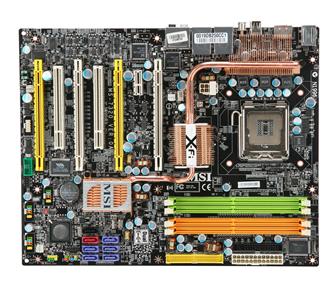
Tech Link (Motherboard): MSI P35 Platinum Motherboard

HotHardware posted a review of a new board from MSI* with the newest P35 chipset from Intel. The author is pleased with the results, check it out if you are itching to upgrade your current motherboard.


Three years ago, Intel launched the 925X / 915 chipsets and were criticized by some for introducing some new technologies before the market demanded them. This time around, however, with the launch of Bearlake, Intel has scored some points. The P35 chipset brings with it a handful of new technologies, like official 1333MHz bus speed support and DDR3 to just name a few. But unlike 925X and 915G, P35 comes in both DDR2 and DDR3 flavors, making the platform all the more attractive to price sensitive end users looking to save a bit on their memory expenditures.

Not only does the MSI P35 Platinum, which is one of the first Intel P35 motherboards on the market, have an excellent feature set, it also showed that it has the raw horsepower to keep up with the EVGA nForce 680i SLI and in some cases, we even saw the MSI P35 Platinum outperform the 680i SLI, albeit by very small margins.

It’s also nice to see that MSI is once again trying to implement new and interesting ideas like their ‘roller coaster style’ motherboard heat pipe cooling technology. Not only does it look cool, it even stays relatively cool to the touch without a fan due to its effective heat dissipation.

The BIOS was also generally good, with a large number of customizable features that allow for some decent overclockability.

The only issues with the board that came up during the review process were the inaccuracy of the motherboards debugger and the fact that it was quite difficult to read. The board also only has four SATA ports, which because of today’s dirt-cheap hard drive market and more common SATA optical drives, may not be enough for even a motherboard targeted toward the more mainstream computer builder.

But overall, the MSI P35 Platinum is a solid motherboard. It is a solid performer, has good features and is overall, pretty well rounded. If you’re looking for a new motherboard for your next Intel Core 2 system and want the latest motherboard technology at a reasonable price, the MSI P35 Platinum is definitely a product to consider.


Source:MSI P35 Platinum Motherboard

Saturday, March 17, 2007

Tech Link (Industry): CeBIT 2007: MSI motherboard roundup; nForce 680i with Creative X-Fi onboard; Intel 965 plus Crossfire;

Digitimes has a good coverage for the CEBIT2007. They posted a neat slew of motherboards from MSI*, with i965 and nForce chipset. Check it out...


The P6N Diamond combines some of the big names in enthusiast hardware; the nForce 680i – the current flagship chipset from Nvidia, and Creative's X-Fi Extreme Audio. This integrated version of the X-Fi series may lack some of the features that the add-in cards deliver, but for many the opportunity to have X-Fi onboard means lower costs and better performance than other integrated audio solutions. MSI mentioned that it has been working closely with Creative for over two years and the co-operation is working well for both parties.


Source:CeBIT 2007: MSI motherboard roundup; nForce 680i with Creative X-Fi onboard; Intel 965 plus Crossfire;

Thursday, January 25, 2007

Tech Link (Motherboard): MSI P965 Platinum Motherboard – Great OC without huge price

I took a look at TweakTown and notice their nice review. It's a mouthful, so ready your favorite snacks before reading the article. They are mighty impressed with the board, if price/performance is the factor. Check it out, it might also be the board you are looking to partner with your processor.


Final Thoughts
Intel’s P965 chipset has really shown us lately there is really no great point in getting a more expensive 975X chipset based motherboard but why? P965 has native DDR-2 800 memory support, its FSB overclocking potential is usually higher and it supports more peripherals on the ICH8 Southbridge. With Crossfire reorganisation from ATI, it has all the features of the 975X and more.

MSI’s second P965 motherboard they have sent us left a much sweeter taste in our mouths. The cheaper P965 Neo that was originally sent to us really should not have been considered, however, we can say that the P965 Platinum has some major pull here and it’s quite a capable product. And it’s really not that much more expensive than the Neo version.

One of the major benefits of the MSI P965 Platinum (around $195 AUD) over the Gigabyte DQ6 is its price. It’s pretty well close to half the price of the feature-packed and overclocking monster DQ6 (around $335 AUD) but with a couple PCI Express x16 slots to support Crossfire and some very decent FSB overclocking, this motherboard from MSI is definitely a very good motherboard for the price.

It lacks some of the kicks and thrills of the more expensive motherboards on the market at the moment but if you’re looking for a no fuss motherboard for your Core 2 processor that will provide very good overclocking and most of the features you will need without the huge price tag, MSI have answered your prayers.


- Pros
Price is very good – 40% cheaper than DQ6
Crossfire Ready
Good overclocking results
Quad Core support
Silent passive cooling
Plenty of room around the CPU for large heatsinks

- Cons
Placement of the onboard power connectors could reduce airflow


Source:MSI P965 Platinum Motherboard – Great OC without huge price

Sunday, January 07, 2007

Tech Link (Motherboard): 975X Express Motherboard Round-Up: Foxconn, Abit, and MSI

HotHardware posted a nice round up of motherboards that supports the new Intel processors. If you are looking for one, and can't decide which brand to take, take a gander and decide for yourself.


Performance Summary: All three of the 975X Express-based motherboards we tested performed similarly throughout all of our benchmarks. Overall, the Abit AW9D-MAX came away with the most benchmark victories, but the deltas separating the boards were always quite small. Strictly form a performance standpoint, there isn't much to differentiate the Abit AW9D-MAX, from the Foxconn 975X7AB-8EKRS2, or the MSI 975X Platinum v2. But, there are other things to consider of course.

Foxconn 975X7AB-8EKRS2H: There is a lot to like about Foxconn's 975X7AB-8EKRS2. According to our PriceGrabber price search engine, this motherboard is the least expensive of the three motherboards we looked at here, and could potentially be the least expensive, Core 2 compatible 975X Express-based motherboard available currently. At about $172, the Foxconn 975X7AB-8EKR2S is a relative steal. This motherboard exploits all of the features inherent to the 975X Express (CrossFire, HD Audio, Matrix RAID), and incorporates some innovations like Fox One and a solid state VRM. Performance and stability were both solid throughout our testing, and the board overclocked quite well. If you're in the market for a well appointed 975X Express-based motherboard, you owe it to yourself to check out the Foxconn 975X7AB-8EKRS2H.


Source:975X Express Motherboard Round-Up: Foxconn, Abit, and MSI

Sunday, December 24, 2006

Tech Link (Motherboard): MSI P965 Platinum

The folks over at [H] has placed an MSI i965-based board to the test bench. While it performs well and shows no sign of nagging problems, [H] doesn't give this board a big thumbs up. Check it out...


Dan's Thoughts:
Working with the MSI P965 Platinum was a pleasant experience, but not a perfect one. For starters, the motherboard always changes the boot sequence whenever any drives are added, or if the drive configuration changes in anyway. This lead to a situation where the system wouldn’t boot, and I’d have to go back into the BIOS and change the boot sequence again. This is not an issue that is specific to MSI as many motherboards do this, but there has been a change started in the industry to correct this. Otherwise, I also had several issues with stability until I raised the ram voltage to 2.1v. The memory defaults to 1.8v, which was totally unstable. (Editor's Note: In my testing with different Corsair RAM we showed not voltage issues whatsoever.) I had another issue once the OS was loaded originally. When I went to install the .NET framework, and the Catalyst 6.9 drivers for my test X1800XT Crossfire setup, the OS blue screened, and I was forced to re-install it. This was an isolated incident, and I have no explanation why this happened.

Stability at stock speeds, while running my drive benchmarks and network tests was exemplary. For 48 hours, the system ran flawlessly, and gave me no issues. During the stress test I ran Orthos and ran SuperPi along side it just to be extra abusive. The system performed flawlessly under these conditions. Overall the MSI board was easy to work with and the problems I did encounter were easy to solve or work around entirely.

Essentially, the P965 is a great motherboard, especially at stock speeds, but unremarkable. Overclocking is mediocre, but not horrible. The layout is excellent, and the board has a solid feature set, and isn’t over burdened with an excessive amount of features that most users will likely never touch. Some issues I experienced were annoying, but should easily be fixed with BIOS and driver updates. All in all the P965 Platinum merits some consideration and I would recommend it for use in non-overclocked or mildly overclocked systems, but for the hardware enthusiast, I think there are better choices out there.

The Bottom Line
MSI has presented us with a very stable motherboard in the P965 Platinum. It ran like a champ under very heavy usage models at stock settings. When it comes to enthusiasts looking for overclocking motherboards for new Core 2 Duo processors, there are better choices available.


Source:MSI P965 Platinum

Sunday, November 19, 2006

Tech Link (Motherboard): MSI P965 Platinum Review

Hmm, Blogger seems to be having a bit of a problem lately. Ever since I transition to their "beta" site, I have always been having quirks and fits and hiccups. Anyway, I found a review that is quite nice for stock or low overclock. The author seems to have issues pushing this motherboard higher than 366MHz. If you are not an overclocker and is figuring out what board to pair with your nice, and shiny conroe, give this review a look and decide for yourself. Expand for more...


Core 2 Duo has brought upon us a massive influx of motherboards all vying to hold together your fancy new Core 2 PC. Despite these many options however, there are only a handful of chipsets being employed by motherboard manufacturers in all Core 2 supporting motherboards. We've both P965 and 975X based boards and found them to be excellent products. We also looked at MSI's own 975X Platinum which was a fair contender against competitors. Today we are reviewing their more budget oriented P965 flavoured board for Core 2 Duo.

The MSI P965 Platinum, as you may imagine, uses the 965 chipset from Intel and has full support for Core 2 processors as well as a number of other important features. While 965 based chipsets don't feature full bandwidth Crossfire as their 975X counterparts do (we'll get into this on the next page), they are able to reach higher FSB speeds for overclocking chips with lower multipliers. Our full review will take a look at all the aspects of this board including its overclocking performance so keep reading!


Source:MSI P965 Platinum Review

Saturday, October 21, 2006

Tech Link (Motherboard): Intel P965: Mid-Range Performance Sector Roundup

It seems that AMDTech got out there and make a whooping review of different motherboard makers based on the i965 chipset. Well, all I can say is that they are learning when judging what motherboard to get. I have been saying this in the forums for such a long time: it's not all about performance; warranty and support must also be top notch.

For extreme hardcore enthusiasts, it's not much because most of the time, their warranty is void anyway. But for 99.999999999% of the population out there (yes, I am exaggerating) performace difference of 0.00000001+/- between manufacturers isn't much of a big deal. Oftentimes, users will end up having a nightmare of an experience RMAing their broken board. Anyway, if you woud like to read on their thoughts, expand this posting...


Final Words

After twenty five pages of information we can safely say that an Intel P965 is still an Intel P965 no matter which motherboard you place it in. This should come as no big surprise as the days of one motherboard manufacturer truly outperforming another one at stock clock speeds with the same chipset is over. The basis of competition is now on features, price, warranty, appearance, overclocking capability, accessories, availability, and reliability. If that sounds a lot like the motherboard being a commodity item, it is, as the consumer expects or demands a certain level of performance and support from all motherboards. They will pay extra for the features that are deemed important based upon their needs. One only has to look at the fallout and consolidation of the motherboard suppliers over the past couple of years to realize this simple fact.


While we believe performance is still extremely important, it is no longer the only reason to consider a particular motherboard supplier. In our opinion, the features, price, warranty, support, and reliability of the motherboard should be first on your list as base performance will generally be equal among all motherboards based on the same chipset. To a lesser degree even the performance amongst various chipsets for the same CPU family performs almost identically now. It comes back to features and support for making that final decision. We would love to make a final decision on the boards we tested today but we have another eight or so left to present to you. We can draw a few conclusions from the results and information we presented after testing these boards for past few weeks. Our first conclusion is that the P965 was released too early and the first motherboards while being very solid from a features and quality viewpoint had very immature BIOS releases.

The inability to boot many boards with most performance oriented memory modules was inexcusable. Do not get us wrong as it took two to tango this sorry dance. We blame the memory manufacturers also as they were just as guilty by having modules in the market with SPD settings that assumed the board would boot at 2.0V or higher. While the motherboard manufacturers will state they followed Intel's 1.8V requirement they are still guilty for not having the BIOS cycle properly to recognize the memory speed, voltage, or timings after the POST issue. The majority of these issues have been solved with the latest BIOS or SPD releases. We still cringe when installing a new memory module but now concentrate on how well it performs instead of crossing our fingers and calling the psychic hotline.

Other issues included incompatibilities with the new SATA/IDE controller chips resulting in PIO mode operation or failure to see the drive at all. This goes back to quality control and pushing an early release. It also brings up the point that Intel in their infinite wisdom decided to pull PATA support from this chipset when over 98% of optical drives are still based on PATA technology. They could have waited for the Bearlake chipset next year to do this. This change also increased the cost and complexity of the motherboards as you now introduce another chipset on each and every motherboard sold.

Overall, the BIOS releases have greatly matured and the amount of issues have declined sharply over the last two months. In this case we have to give credit to the motherboard and memory suppliers for acting quickly... but only after upsetting an untold number of customers. While there are still a few nagging issues here and there, like getting AHCI to work on the Intel ICH8R equipped boards without an engineering degree and a day off, we are seeing most of the issues being reduced now to what we have come to live with in an open PC hardware world. Those issues would be where a combination of parts that you would never expect to be used together creates an issue that is extremely difficult to fix or even diagnose. We still get mail on a fair share of those and will report our findings in the final article. We can safely say that with out list of components used in our test bed that our motherboards were virtually error free of issues that would cause instability or create a no POST situation.

Overall, the Gigabyte GA-965P-DS3 performed the best in our benchmarks when not overclocked. This is a very good accomplishment and shows a level of consistency and fine tuning that was not matched by the other suppliers. However, the total margin of victory over the other P965 motherboards is less than one percent. It took several hundred hours of benchmarking to come to this conclusion and without those benchmarks it would have been impossible to tell the difference between any of the P965 motherboards tested today.

The overclocking capability of ASUS motherboards continues to be impressive in their mid-range series. If you are looking to get the highest possible overclocking results with an E6300 or E6400 processor then we would recommend the ASUS P5B-E 1.02G at this time. Of course it is not available yet (it will be shortly) and unless you have expensive PC2-8000 RAM then chances of going over 500FSB are not that great with the ASUS P5B-E 1.01G board. However, it is hard to complain about the ASUS 1.01G board with 7x490FSB results using mid-range PC2-6400 memory. Gigabyte has not solved their Micron D9 1GB module issue yet so they are stuck in the 450FSB range with our test components. Biostar has a 500FSB level BIOS limit but more importantly you cannot find the board. That brings us to Abit and the AB9-Pro which has improved its overclocking capabilities a great deal since we first reviewed the board but apparently has reached its limits at this time. If you have an E6400 or E6600 then this board still has great overclocking potential for the majority of users.

When it comes to features we really liked the ASUS and Abit boards as they provided just about every possible option on a midrange/performance motherboard that one could want. While the Gigabyte and Biostar boards are also feature rich, they both lack Firewire support which should be a given on boards in this price range. We have to have to give Biostar a gold star for overall layout design although the location of the 24-pin and 4-pin ATX power connectors are a detraction. The ASUS and Gigabyte motherboards have fairly standard layouts that we could live with on a daily basis but we have to wonder what the layout design group at Abit was thinking when they placed the IDE and two SATA connectors between the PCI Express x1 and PCI slots. We will call it a creative design inspiration at this time to be nice as we still like the board's overall capabilities.

The Analog Devices AD1988A HD Audio Codec really put the screws to the Realtek ALC-88x series of HD Audio Codecs in our EAX 2 gaming tests. The EAX sounds were clear and concise unlike some of the warbling and muddy sound generated by the Realtek codecs in our Battlefield 2 test. While the audio quality of both codecs was almost equal in our standard game, DVD video, and audio tests we still think the ADI solution had the superior overall audio quality.

Wrapping up part one, there was not a real loser in this group. Each board has its strengths and weaknesses so it comes down to what the individual user wants in a board that will meet their needs. We received varying support from each supplier and not in a way you would think. Our direct support was excellent but we wanted to find out how well the manufacturers supported a retail customer so we acted like one. We logged on to their support forums if available and asked questions about our issues or those of other users. We purchased retail boards (when possible) and called technical support. We emailed, faxed, or otherwise bugged the hell out of some customer support personnel for the last six weeks. We will provide our results in the final article and these results will help determine our Editor's Choice awards. After all, it's not just about performance anymore.


Source:Intel P965: Mid-Range Performance Sector Roundup

Friday, October 20, 2006

Tech Link (Graphics): MSI RX1950XTX-VT2D512E Water Cooled Edition (Radeon X1950 XTX)

If you feel like wanting to have watercooling for your video card yet you aren't feeling you're up to it, maybe you can resort to a factory-ready watercooled solution then. HardwareZone has an article about this watercooled high-end gaming video card that will certainly be fit only to those who have the $$$ but not the experience nor the courage to embark on DIY watercooling system. Expand for more...


Conclusion

Vendors have been gradually encroaching into niche segments in order to differentiate themselves. An example would be how liquid cooling, which used to be custom projects involving lots of time and effort, becoming a mainstream product available off the shelves. Perhaps the enthusiasts who used to have the time to indulge their hobbies have all grown up or moved on. Or maybe they just saw the writing on the wall: their hobbies are no longer niche and Big Business has muscled into their field. It's not necessarily a negative development since those who lack the technical skills would benefit. But there's also probably a proportion who feel that the 'exclusivity' of their niche has been lost. Not to mention that the motivation to start projects like liquid cooling will be undermined by the easy availability of such products. There are probably some who would hence move on to other less developed, niche hobbies. Overall though, the market has probably increased in size, with terms like overclocking entering the mainstream consciousness.


MSI's latest effort shows how far the manufacturers have come. A third party liquid cooling kit by Thermaltake is grafted onto a Radeon X1950 XTX by MSI. Practically all the work has been done, whereas in the past, there could be no such thing as a readymade liquid cooling kit. Is it more convenient for consumers? Definitely. However, judged as a Radeon X1950 XTX, the performance of the MSI RX1950XTX-VT2D512E did not break new ground, due to its standard clock speeds. Neither did we manage to overclock it beyond the usual limits of this chipset. You could probably notice a drop in noise with the Tide Water Mini liquid cooling kit but that's only if you have the fan at the Low setting. Then, the temperatures were at best on par with the reference card though more often than not, they were a tad higher. In short, on almost all possible criteria, the MSI card only had a minor edge in terms of operational noise levels.

Since everything has been done for you, MSI will naturally expect you to pay for the convenience. While we don't have a confirmed retail price for this card at the moment, it will probably add up to more than the combined total of the selling price of a typical Radeon X1950 XTX and that of the Tehrmaltake Tide Water Mini unit. Throw in the new Heroes of Might and Magic V game and other accessories in the bundle and the cost of this product can be quite substantial. The standard Radeon X1950 XTX goes for around US$430 - US$450 so you can probably add 60 to 80 dollars to that, based on the average price of the Thermaltake liquid cooling module. For some, it looks like a cool toy thanks to the novelty of liquid cooling but be warned, it's not for those with shallow pockets.


Source:MSI RX1950XTX-VT2D512E Water Cooled Edition (Radeon X1950 XTX)

Monday, July 10, 2006

Tech Link (Processor): all WR result?!looks performance@kentsfield XE6700+MSI 975X ver2.1

coolaler is on world-record breaking spree. He has just broken so many world records with Conroe, and now, he is doing it again with Kentsfield, Conroe's big brother, sporting four operational cores. This is truly an amazing show of Chipzilla CPU power. Go check it out at XS.

all WR result?!looks performance@kentsfield XE6700+MSI 975X ver2.1
Intel Core 2 Duo Kentsfield X6700 8mb cache

M/B :MSI 975X Platinum ver:2.1
MEM :G.SKILL HZ DDRII 1000 1GBX2 Dual Channel
HDD :Maxtor 300g SATAII 16Mb Cache
VGA CARD :WINFAST 7950GX2
POWER: Zippy 850W
OS :WIN sever 2003 & WIN XP SP2
CPU COOLER:Tower 120
CPU :Intel Core 2 Duo Kentsfield X6700 8mb cache

ok!Tower 120@3.7g
sisoft snadra


Source:XS

Friday, June 16, 2006

Tech Link (System): Running Two Systems with a Single PSU

You have got to love what HardwareZone did to their two "bare naked" systems, running on on a single PSU. The system is running with a very powerful processor, in the incarnation of Intel® Core™ 2 Duo with an MSI* motherboard equipped with an Intel® 965P Express Chipset, an MSI* 7300GS Video Card, a Fujitsu 2.5in mobile 60GB SATA hard drive, and 4x512MB Kingston DDR2-800. Aside from the unique way of getting this two systems built with one PSU, the beasty machine is very very nice looking in its fiery red theme, and consuming a little over 200w! Omigosh!

A lot of users often asked if it was ever possible to run two systems with a single power supply unit. While some users reported success, it wasn't something that we would encourage since most of today's processors would be too power hungry. It may still be possible to power up two of the latest Intel Pentium D or Athlon 64 X2 systems but you may need to get a pretty powerful power supply to get it working.


Source:HardwareZone

Tuesday, May 09, 2006

Tech Link (Processor): Conroe E6400@MSI 975X Platinum

Hot off the press, the pictures are taking long to load so be patient. You may encounter broken links from time to time, just keep reloading ;). I'll host them as soon as I got time.

Source:XS

Friday, January 13, 2006

Press Release: MSI announces Intel Mobile CPU based server solutions

This year is the dawn of the new era for Intel®. The onslaught of low-power, high-performing system is creeping on system integrators, OEMs, ODMs, distributors, premier channels, and retailers like a plague. One of the known manufacturer just announced their new server system based on, hold your breath, an Intel® Pentium® M Processor.

Would you believe that, the formerly known mobile processor is now integrated into a powerful system such as a server. I guess, my DFI 855GME-MGF and Intel® Pentium® M 730 is indeed a great system, acting as my file server at home. My Intel® Pentium® M-based home server is housed on an Antec Aria, with a measly 250w ATX PSU, a 512MB DDR400, a DVD drive, Intel RAID controller and 2x80GB SCSI harddrives and it never gave me a headache. It also acts as my secondary DNS server for internet, print server, and a DHCP server as well.

P1-104A2M & 915GM Master-A4R server barebone and board
Micro-Star International, a world class mainboard and graphic card manufacturer, introduces new 1U entry server solutions distinctively catered to enterprise customers. P1-104A2M rack mount server is built on a series of new technologies and features to outperform other competitors. MSI perfectly integrate DDR2 533 memory module, high speed PCI Express technology, and dual Gigabit LAN to make P1-104A2M the most powerful and reliable server platforms to meet the highest standards with abundant expandability for future upgrades.

MSI P1-104A2M rack mount server supports Intel Pentium M mobile processor for various purposes. And 2 DIMM slots are available for up to 2 GB of Dual Channel DDR2 533 memory. Especially, two GbE LAN ports and one 10/100 LAN ports make it an ideal platform for firewall application. The two PCI Express x8 slots are 100% compatible with new generation expansion cards, which can transfer up to triple data bandwidth than traditional PCI-X standard. P1-104A2M rack mount server is equipped with two external hotswap Serial ATA hard disk drives. On the other hand, MSI also offer 915GM Master-A4R server board with extra IDE and SATA storage interfaces and more PCI-E slots to meet different requirements and applications.

Source:MSI