Showing posts with label asus. Show all posts

Saturday, June 23, 2007

Tech Link (Motherboard): Asus P5W DH Deluxe/WiFi In-Depth Overclocking Review

madshrimps has posted a review of a "relatively" old board. After reading it, I felt that it wasn't about the baord itself but more on the overclocking side of things. I kinda agree with the author about the Dewar + LN2 thing, as this seems to be the most common way to proclaim leetness nowadays. Am I against it? Definitely not, but I am not as excited as before, when I really have to dig out all the crazy mods and stuff like that. Anyway, check it out and sorry for the rant..


Conclusive Thoughts:

The P5W DH Deluxe will most likely be retired with honors as an Asus classic. Unfortunately we cannot do much about the boot-strap issue except to try and work with it. With the price of DDR2 4GB kits such as GSkill 2x2GB DDR2-667 for $199 Newegg (CL4-4-4-12 @ 1.8 ~ 19V) this would make for a powerful Gaming system in Crossfire mode, or a great little Server with WiFi and the EZ-RAID back-up. Although reading through the Xtremesystems thread indicates some P5W DH owners have misdirected their dissatisfaction towards Asus, sadly they seem unaware Asus cannot re-design the 975X. Lest we forget this chipset was originally released in 2005 and if any company would find a work-around Asus would given the 865PE pseudo-PAT debacle. When I began this article I wasn't sure where it would lead me and I thought 400FSB was my limit on this board. To see 445FSB performance and then 460FSB + potential I can only hope those frustrated P5W DH owners will go back to the BIOS and try again.

As I stated earlier 8300MB/s is the highest I can recall overclocking any Intel system lately and while it’s not up there with the “Big Boys”, so what. Anyone can buy the most expensive hardware and then break records; I don’t recall the Art of Overclocking ever being about that. Overclocking used to be a community of DIY hobbyists whom aided one another to get more from less. What happened? I can pour LN2 over my head and proclaim to be COOL, all it costs is the price of a Dewar. Although the P5W DH is still fetching a premium price ( $199 at Newegg) the P5W DH still has much to offer and I hope this review has shown just how much. We ran our E6400 at 445FSB passing all benchmarks and this system has been running for 14-days straight at that speed Gaming, multitasking and running SETI BIONIC without incident.


Source:Asus P5W DH Deluxe/WiFi In-Depth Overclocking Review

Sunday, June 17, 2007

Tech Link (Cooler): Asus Arctic Square Heatsink Review

The folks over at FrostyTech busy themselves with a new Asus heatsink. I really like the heatsink, well, the looks is a killer. The reviewer found the cooler performs well, though it is not the king when it comes to bringing the lowest temperature in their own database. Expand to read out an excerpt of their article...


Ultimately the Asus Arctic Square heatsink is a good lower noise thermal solution with the capability of handling higher heat loads from modern day multi-core processors, or for adequately cooling single core chips from either AMD or Intel. Its bulky shape may prevent it from being used with some motherboards that have large heatsinks mounted to the MOSFETs or northbridge, but otherwise the Asus Arctic Square heatsink is easily recommendable.


Source:Asus Arctic Square Heatsink Review

Friday, June 15, 2007

Tech Link(Motherboard): ASUS P5K3 Deluxe

HardOCP has a new motherboard review up for your scrutiny. This bad ass motherboard sports the latest chipset from Intel and supports the latest Intel processor and can overclock well too. It didn't get the highest Gold honor, but still, a pretty cool board if you're a kind of geek who always wanted to try things out first thing they came out on the stor. Expand to read the conclusion...


The Bottom Line

The ASUS P5K3 proves to be another motherboard founded on stellar engineering culminating in great stability, excellent performance, and solid overclocking prowess. This is an expensive motherboard however and once you factor in the cost of DDR3 modules you are going to find yourself easily above a $600 upgrade investment.


Had we seen it outpace other motherboards in top end CPU bus overclocking it certainly would have been worthy of a Gold [H] Award. Still the levels of overclocking shown on the P5K3 are nothing short of awesome and will likely fill the needs of any overclocker other than the super-hardcore.


Source:ASUS P5K3 Deluxe

Thursday, May 24, 2007

Tech Link (Motherboard): Asus P5K3 Deluxe WiFi AP with DDR3

BitTech has posted a review of the new board from Asus*, based on Intel's newest chipset in town, supporting DDR3. While the crew at BitTech gave it a perfect 10 in features, the "value" is at low score of just 5. Over all, they gave the board a 7, but I am not really sure if it reflects the experience, as the score seems to be the "average" of (10 + 6 + 5) / 3 thingamajig. Check out the Final Thoughs by expanding this news post...


Final Thoughts
Apart from the ton of features and excellent stability, the board doesn't offer any spectacular performance and is far more expensive than the competition, or even other Asus boards. You'd be far better off investing in anything DDR2, rather than forcing yourself down and extremely expensive upgrade path. It will allow some future proofing, but by that time in 12-18 months, you might as well upgrade the motherboard with a newer chipset which will undoubtedly support faster DDR3 modules and newer features as well.

It's a really weird situation because it's genuinely a really good board, but there's absolutely no reason to buy it. Get the P5K Deluxe or something P965 or nForce 680i (LT) SLI instead... oh and a ton of performance DDR2, a large monitor, a better graphics card and perhaps a new car or apartment as well. You know, the same kind of money you would have spent on the P5K3 Deluxe and DDR3.

It you're after CrossFire support to match a couple of Radeon HD 2900 XTs you've just bought (I'm assuming you run Vista here) and are dying for an updated chipset rather than the antique 975X, then you've either got to settle for the DFI LANParty UT ICFX3200 T2R/G, or wait until September for X38. However, X38 will also be DDR3, sooo I'd just buy the DFI...


Source:Asus P5K3 Deluxe WiFi AP with DDR3

Monday, May 21, 2007

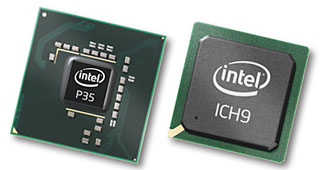
Tech Link (Chipset): Intel P35 Bearlake Motherboard And DDR3 Memory – Asus and Corsair

The lucky folks over at HotHardware managed to get themselves some cool motherboard and memory to play with. They have tested DDR3 and the newest motherboard from Asus with the latest chipset from Intel. They are pretty much happy with the results, check out the conclusion...


Performance Summary:
Over the course of our testing, we saw the new Intel P35 chipset and DDR3 memory combination offer up gains in the 2 - 5% range in various applications. This was largely attributed to the new Intel MCH and its improved access latency characteristics. There were several occasions where the P35 chipset driven Asus P5K3 Deluxe out-paced its 965 counterpart with the same DDR2 memory running in its DIMM slots. In terms of DDR3 memory, it's obvious the technology is still maturing somewhat but at its higher clock speeds, especially with a correspondingly higher FSB, there are significant gains to be had.


Intel's new Bearlake chipset family is off to a great start with the P35. Our first time out with this new chipset showed surprisingly good stability and performance with obvious headroom for growth. One look at a 1733MHz DDR3 clock speed and you can't help but get a little bit excited for what the future holds. The only caveat will be how quickly latency settings can be brought in line.

At this point in the game, if you were building a new system for work or pleasure, its probably doesn't make sense to spring for a DDR2 driven version of one of these new P35 motherboards, like the Asus P5K we tested. The product simply will have a more finite life-span with the inevitable migration to DDR3. In addition, DDR3 has a bit of growing-up to do for the next few months, so we'd recommend users wait and see what second generation products coming down the pipe will offer perhaps. Refinements in motherboard design are bound to be forthcoming, as well as tighter timings for DDR3.

Though, if you're itching for something to tinker with and spending a little extra cash on being an early adopter isn't out of the norm for you, we'd say jump in, the water is just fine. The P35 chipset with its snappy new memory controller impressed us more-so than many chipset product launches of late and we've seen plenty. What's perhaps more exciting is the upcoming X38 chipset with PCI Express 2.0 technology and a few extra lanes integrated with the chipset to boot. It's always hard to judge the entry point with a new platform but these are good problems to have.


Source:Intel P35 Bearlake Motherboard And DDR3 Memory – Asus and Corsair

Monday, May 07, 2007

Tech Link (Chipset): P35 "Bearlake": Asus P5K Deluxe and Gigabyte P35-DS3R Preview

While NDA for the chipset and actual products hasn't been lifted off yet, actual product pictures are now circulating around the net for some exposure. Of course, the missing piece across these product showcase are performance numbers. But hey, if you really like to see some early numbers, you can head on over here and here. For those asking me if I will still buy motherboard based on i965, the answer is it depends. If I already have a motherboard with this chipset, then I won't be buying another one based on the same, but will jump over to the newer one. However, if I still don't have any board based on this chipset and I need a new board now, then yes, I'm all over it. Anyway, check out the article over at neoseeker for some product tour of Gigabyte's and Asus' offerings of upcoming board.


Conclusion
While I'd love to tell you more about the P35 chipset, and Gigabyte's interesting P35-DS3R, along with the ASUS P5K family, those pesky little NDA's requires us not to reveal more until those NDA's are lifted.

But don't worry.

I'll be putting the P35, with both DDR2 and DDR3 memory through some serious torture testing to find out how well the P35 and DDR2 & DDR3 perform.

Frankly, I can hardly wait to find out if Intel has managed to outdo its excellent P965 chipset; and how well Gigabyte and Asus did on their first P35 implementations.


Source:P35 "Bearlake": Asus P5K Deluxe and Gigabyte P35-DS3R Preview

Saturday, May 05, 2007

Article: The Journey with Intel® Core™ 2 Duo E6320, The Last Ditch Effort for 100% overclock (Part IV)

Being the fourth and final installment of the article, I will share my benchmarks and notes about my attempt to bring this processor to new overclocking heights on air. If you haven't read up on it yet, make sure to check out the previous installments here (3rd), then here (2nd), and first installment here. Expand to read the continuation...

The 500MHz wall has been breached already, and at this kind of overclocking, there's no other way but up. The motherboard, processor, and memory are all operating way beyond their stock settings, and at the brink of hitting the wall. But this is not an excuse to stop, as I have stated from the start that I will push the processor farther than my earlier attempt. I am now focusing my attention of breaching 100% overclock. It's daunting to say the least, unless I use better aftermarket cooling device, this is looking more and more impossible. As much as I am a chicken in overclocking, I have just got to try it this time.

::Overclocking and Benchmarking Notes::
Reaching for 100% overclock is certainly not easy, specially with a freaky ambient temperature of 36c, an old unlapped overused Thermalright* XP-90, unmodded Asus* {5B Deluxe and a mere OCZ* DDR2-800MHz Platinum Rev2 memory. The processor and motherboard chipset are both overclocked at ~95% while the memory hits a good 30% overclock at CL5-5-5-15. The processor needed massive voltage of 1.6v just to make it post at 532MHz. After tweaking other settings, 100% overclock is breached! Click on the image for the validation.


However, at 100% overclock, I can't complete any kind of 3D benchmarks save for Aquamark 3, only 2D benchmarks are working fine. After several tweaking hours, like lowering the multi and loosening RAM timing, or bumping the NB and SB voltage, I gave up and pushed down the overclock to just 520MHz. At this clock speed, it is rock solid, and no benchmark can bring it to a halt. I have added a link to FutureMark ORB for all the 3D benchmarks run as well as PCMark05 for comparison and proof of testament to its rock stability. Click on any of the 3DMark and PCMark05 benchmark to visit the ORB compare link.

::Benchmarks::
Gaming:
Doom3: Low Quality-640x480


3DMark Benchmarks:
3DMark01: Overall


3DMark03: CPU


3DMark05: CPU


3DMark06: CPU


Aquamark03: CPU


Multimedia/Multitasking/Multithreading Benchmarks:
Cinebench: Render Score


Cinebench: Render Time


PCMark05: Overall


SANDRA: CPU


SANDRA: Multimedia


wPrime: 32M


SuperPi: 1M


Memory Benchmarks:
SANDRA: RAM Bandwidth


Others:
WinRAR


Temperature


::Concluding Thoughts on Overclocking Experience::With this final installment, it is clear that the new breed of processor, Intel® Core™ 2 Duo E6320, is overclocking nicely compared to its younger brother Intel® Core™ 2 Duo E6300. The additional 2MB of L2 cache didn't pose any threat to overclockability, but instead helped boost scores by a noticeable margin when benchmarking.

While I am not able to find the maximum clock frequency that the processor can achieve due to limitation, I am quite sure that enthusiats who have more money to burn for better cooling, memory, and motherboard can achieve much higher. Given the problems I encountered with overclocking, I can only conclude that the motherboard and temperature are the two primary culprits that has prevented me from reaching rock stability with 100% overclock.

The Intel® Core™ 2 Duo E6320 is an overclocking king like the original Intel® Core™ 2 Duo E6300, FSB wise and clock frequency wise. Till next, I hope you have enjoyed reading and learning from this article like I have enjoyed testing and tweaking it. FanBoy out...

Saturday, April 28, 2007

Article: The Journey with Intel® Core™ 2 Duo E6320, Breaking The Norm (Part III)

This is the third part of the article about overclocking the Intel® Core™ 2 Duo E6320, and it picks up where the the second part left off. If you haven't seen it yet, you may also want to check out the first part of the article. Expand to read the continuation...

After the successful 75% overclock, which translates to 465MHz from the stock of 266MHz, I decided to try and see if I can still push the system. At this overclock of the motherboard, and processor, I am also overclocking the memory for about 16%. System memory aren't really known to overclock beyond 10%, but this is no ordinary memory, and I will rely on this memory to help me push my overclock further. With the limitations at hand, the processor and motherboard at 75% overclock, RAM at 16%, I set my eyes to reaching the coveted 500MHz. At this settings, the overclock will hit an astounding 88% for the processor and motherboard, and it will be 25% overclock on the system memory.

::Overclocking and Benchmarking Notes::
At this settings, the RAM can not work with full stability if the voltage is not set to 2.3vDIMM. I also have to loosen the timings to CL5. I know that this will significantly increase latency, and may affect benchmark scores. However, I am not after an improved benchmark score in terms of effiency, but more of how far I can push the processor before it bends on its knees.

At first, 500MHz which translates to 3.5GHz and DDR2-100MHz, it would seem really impossible. I am against all odds with such a limited parts in my arsenal, an unmodded motherboard, a RAM that runs at DDR2-800MHz and an aging Thermalright XP90. Couple that with an ambient temperature hovering at 35c to 36c, I am just pushing this baby with mere guts and passion for overclock. Like what I mentioned on the first part of the article, I am changing my stance now and ready to give this processor all that I've got.

While I push the FSB 10MHz at a time, I eventually reach 500MHz. But this doesn't come without a price, 1.38vCore is needed to make it fully stable. While it doesn't seem like a whole lots of voltage, the impact on the core temperature is overwhelming. The system is now idling at 44c, and full load at 67c, my Thermalright is working at full speed, and I can feel all of its four heatpipes brimming with heat. Adding a fan to cool these heatpipes did helped, but there's only so much that this solution could work. But luckily, the system held well, and unbelievably, completed all benchmarks like its nothing. The memory, processor, and motherboard are all working fine and dandy. As such, I can now show more benchmarks and results. Check them out...

::Benchmarks::
Gaming:
Doom3: Low Quality-640x480


3DMark Benchmarks:
3DMark01: Overall


3DMark03: CPU


3DMark05: CPU


3DMark06: CPU


Aquamark03: CPU


Multimedia/Multitasking/Multithreading Benchmarks:
Cinebench: Render Score


Cinebench: Render Time


PCMark05: Overall


SANDRA: CPU


SANDRA: Multimedia


wPrime: 32M


SuperPi: 1M


Memory Benchmarks:
SANDRA: RAM Bandwidth


Others:
WinRAR


Temperature


Loaded Temperature Screenshot


::Closing Thoughts with 88% Overclock::With how things are going, I know that it won't be long till hit the ceiling. Whether it's the processor, memory, or motherboard, I still have yet to see. For now, things are going well, but a little over the edge already. If you plan on overclocking your system at this settings, a good aftermarket cooler can really help. I still plan to overclock it even further, and I hope you'll come back again to accompany me with my journey. Till next...

Thursday, April 26, 2007

Tech Link (Motherboard): ASUS Bearlake P35 Chipset DDR2 P5K Deluxe and DDR3 P5K3 Deluxe

AndreYang of XS manage to get his hands dirty with an upcoming Asus* motherboard. It looks really nice, with a new chipset from Chipzilla and supporting DDR3. AndreYang posted lots of pictures, but not benchmark results due to NDA. Be ready for some pic loving post over at XS, check it out...

Source:ASUS Bearlake P35 Chipset DDR2 P5K Deluxe and DDR3 P5K3 Deluxe

Wednesday, April 18, 2007

Article: The Journey with Intel® Core™ 2 Duo E6320, An Uphill Battle! (Part II)

This is the second part of the article I started a couple of days ago. If you haven't seen it yet, I suggest to check it out as I have put in lots of information in there. I have also submitted my 3DMark06 score over at hwbot.org, and sadly, it never really got too far.

While the previous overclock reached was 50% above nominal, the score is not enough to be a stand out. Compared to other processors, it would seem that 50% is still relatively conservative. However, with the current memory that I have, the default speed it runs is at DDR2-800MHz. Apacer* really worked well, and it served me well till I hit a wall at 450MHz FSB or DDR2-900MHz. No matter what voltage and cooling I tried, it won't get stable enough to complete 3DMark06. At 2.4v with timing of CL5-5-5-18, stability is a big question. For this reason, I am forced to change strategy and tore open an OCZ DDR2 PC2-6400 Platinum Revision 2 Dual Channel memory.

Memory: While I always drool for two sticks of 1GB OCZ DDR2 PC2-7200 Special Ops Edition, lack of $$$ and availability prohibited me. If not for FUGGER of XS, I would have not been able to acquire this memory, free of charge. Thanks FUGGER and XS, you and the forum rocks! Anyway, back to the memory, it has a pretty good timings of CL4-4-4-15 at DDR2-800MHz at 1.9v. It'll be the first time I'll be using this memory and it's fresh right out of the box. I am expecting it to perform much better than Apacer Value RAM. As such, let me report the new test set up:

Test Set Up
Processor Intel® Core™ 2 Duo E6320(1.86GHz) Dual Core
Motherboard: Asus® P5B Deluxe BIOS 1011
Memory: OCZ DDR2 PC2-6400 Platinum Rev2 2x1024MB(CL4-4-4-15 SPD)
Hard Drive: Seagate* Barracuda 120GB SATA RAID 0
Video Card: Asus® 7900GTX 512MB v93.74
Power Supply: Delta 670W EPS12V (server grade)
Chassis: N/A
Ambient Temperature: 35c

::Overclocking and Benchmarking Notes::
After reaching 50% overclock, the next target would be 75% overclock of 465MHz FSB. At this stage, overclocking is already beyond all the nominal settings, from the processor, to motherboard, to memory. Previous settings of 399MHz still puts the memory at its nominal speed, and at this speed, the memory will now run way above stock of DDR2-930MHz from DDR2-800MHz. The processor and motherboard is overclocked by ~75%, while the memory is running ~16% at this settings.

While it would seem that the system is holding out, the main challenge is the ambient temperature which is now hitting 35c to 36c which is way too hot. This will definitely be interesting to see if the 75% overclock on the motherboard and processor, and 16% overclock on memory will survive the rigorous benchmark runs.

Aside from adjusting the vCore manually to 1.3v, the vDimm is also set at 2.1v. All other settings on the motherboard are still left at their default or "auto" values.

::Benchmarks::
Gaming:
Doom3: Low Quality-640x480


3DMark Benchmarks:
3DMark01: Overall


3DMark03: CPU


3DMark05: CPU


3DMark06: CPU


Aquamark03: CPU


Multimedia/Multitasking/Multithreading Benchmarks:
Cinebench: Render Score


Cinebench: Render Time


PCMark05: Overall


SANDRA: CPU


SANDRA: Multimedia


wPrime: 32M


SuperPi: 1M


Memory Benchmarks:
SANDRA: RAM Bandwidth


Others:
WinRAR


Temperature


Loaded Temperature Screenshot


::Closing Thoughts with 75% Overclock::It is clear that all the components in my possesion are a gem to behold. The processor is holding out at such 75% overclock, with a mere 1.3vCore and aging Thermalright XP90 cooler. The motherboard never seems to be giving any hiccups and has been a stable platform. And the memory is just showing its fangs at overclocking. Stay tuned as I continue to push this processor, motherboard, and memory! Till next installment, enjoy the benchmark results...